
Contract automation covers the entire contract management process. This ranges from the preparation of contracts to delivery and digital storage to enable a more efficient workflow.
Managing contracts is a difficult task, but thanks to advances in technology, contracts are now easy to automate. Contract automation is a method of using software that allows legal and non-legal teams to handle contract management themselves without involving lawyers at every step. This guide explains why that matters, which pain points it removes, and how to roll it out in seven steps.
What is contract automation?
Contract automation is the use of software to run recurring steps in a contract's lifecycle — from drafting through approval, signing, archiving, and deadline tracking — without manual effort. Instead of passing documents around by Word, email, and PDF, everyone works on a single platform with pre-approved templates, automatic approval routes, and a built-in electronic signature.
The term therefore covers far more than document creation: it describes an end-to-end digital process in which legal and non-legal teams can initiate, review, and close contracts on their own. Our guide to contract workflow automation breaks the mechanics down in more detail.
Why is contract automation so important in today's corporate world?
Contract management is critical for companies because it involves monitoring contracts through a well-documented system and process that keeps every agreement — including its terms, transaction components, and renewals — in view. The importance of contract management in any organization is to ensure that the key people in the company understand their responsibilities and promises to customers and suppliers, and that they are fulfilled.
If you want to think the question through from every angle — who automates, what exactly, why, when, and where — our eBook The 5 Ws of Contract Automation pulls the answers together.
Pain points due to a lack of contract automation
You've seen the contract management process described above, and it underlined that contract software helps you avoid bottlenecks and friction once you're dealing with a lot of contracts. Here are some of the daily issues you'll face if you're not using contract automation:
1. Doubling the work
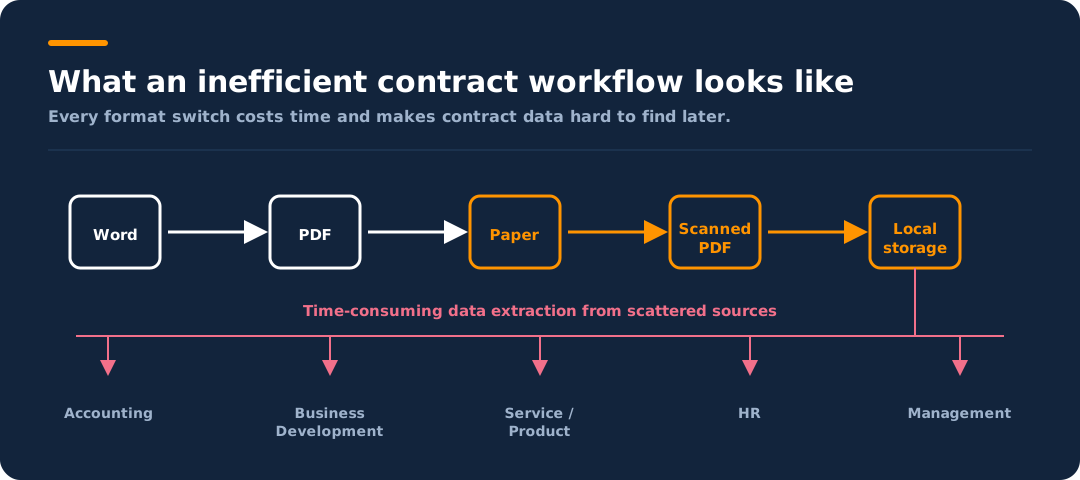
Creating a contract starts with a Word document, which is then presented to the other side for evaluation before being completed in further third-party programs. Imagine what it would be like to do this job on a daily basis. The following infographic shows what an inefficient contract workflow looks like:
2. Increased time required
Your time consumption increases, especially when you search for old documents. You have to dig deep into keywords to find them, either because the paper is somewhere in the office or because it's buried in a previous email. This is a task you have to repeat again and again, and it eats up a lot of time.
With top.legal software, the time to create contracts in the sales process can be significantly reduced by 50–70%.
3. Manual work
It takes a lot of time to print, scan, review, and file documents by hand. That means you can't spend your time on things that help the legal department generate more revenue, because it's tied up with manual work most of the day.
According to top.legal estimates, contract management software saves the sales team 85% of the time spent on administrative tasks.
4. Unsatisfactory experiences with counterparties
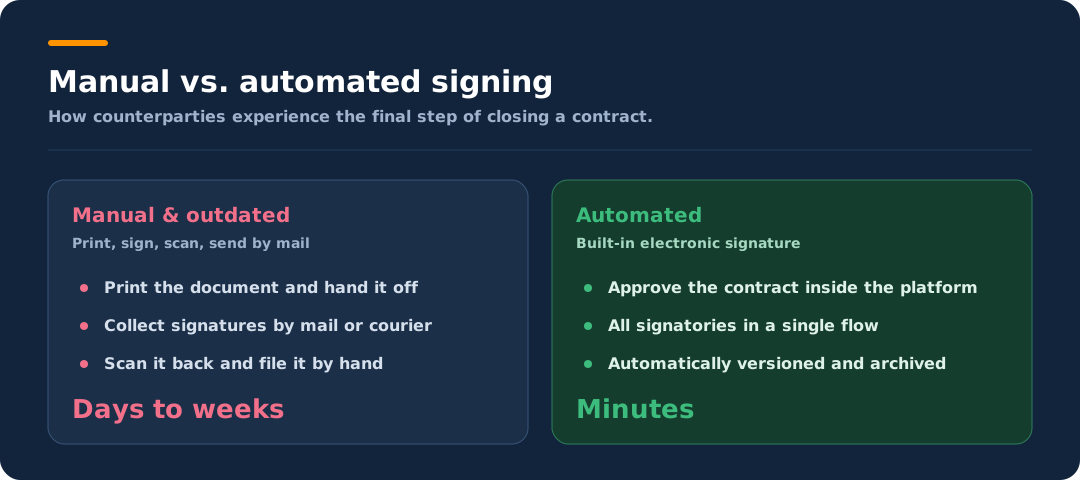
We already live in a technologically advanced world, but if your contract signing process is still manual and outdated, as it was in the 1970s, you won't stand out and companies will hesitate to work with you. Many judge the quality of a business relationship by this very last step: the signing process.
5. Version control chaos
Since contract amendments are usually sent to the other party by email, you have to expect unrest every time you change the contract. To complete the final draft, you need to look through previous emails to make sure you haven't missed any comments. This is a difficult and time-consuming task.
What are the benefits of contract automation?
The pain points above don't disappear with more staff — they disappear with better processes. Automated contracts pay off across several dimensions:
Standardized templates and self-service dramatically shorten cycle time in the sales process — contracts that used to take weeks close in days.
- Fewer manual errors: Templates with locked standard clauses stop outdated versions or faulty wording from going out.
- Stronger compliance: Every version, approval, and signature lands in a tamper-proof audit trail — fully traceable and audit-ready.
- A lighter load for legal: Recurring standard contracts such as NDAs run in self-service, so lawyers can focus on complex, high-risk agreements.
- No missed deadlines: Automatic reminders for renewals and termination dates prevent costly auto-renewals and coverage gaps.
- A better data foundation: Centrally stored contract data can be analyzed and turned into metrics for well-founded decisions.
For benefits specific to sales teams, our guide to the 5 benefits of contract workflow automation has more practical examples.
How does a typical automation process work in contract management?
According to Aberdeen Research, it takes a company an average of 20 to 30 days to draw up, negotiate, and conclude a contract.
With an automated contract management solution, your organization can get the most out of the agreements you've worked so hard to reach while reducing your risk. Contract drafting, evaluation, negotiation, execution, and recording are just a few of the parts that make up the entire contract process. However, with the right approach, powerful contract management software, and the right tools, these activities can become the simplest component of the entire process.
The key levers of contract automation
An automated contract process is made up of several building blocks. The six levers below work on their own — but they only reach their full potential when they work together.
Use automatic templates to draft contracts
Templates ensure that documents are consistent and accurate. You don't need to worry about human errors in drafting or about using older versions of documents. Choosing a template that meets your needs keeps your stress levels low.
Using common templates also speeds up your transactions, because you don't have to create a document from scratch or search your files for previous versions.
Use self-service contracts to your advantage
Self-service contracts allow users to create contracts without consulting the legal team. They significantly reduce the time required for standard contracts such as NDAs, as there is no need to involve the legal department every time.
With pre-approved and readily available self-service templates, every team member can be sure they're using a template with all compliant fields.
Create approval workflows
An automatic approval mechanism simplifies and standardizes the entire contract life cycle. This lets the company spend less time searching for documentation and more time doing actual work.
When implemented efficiently, processing times for applications, expense reports, and approvals drop from more than a week to a few hours in most companies.
Automate the signing process
Signing a contract is usually the last step in the contract management process. If you don't automate it, collecting signatures can take weeks or months — especially for contracts that require multiple signatories. It's even riskier because it needlessly exposes contracts and sensitive information.
Electronic signatures speed up this step. Standalone software for it is impractical, so investing in automated contract management with a built-in signature feature is the better choice. Managing directors are normally responsible for signing, but department heads may occasionally be authorized to sign as well.
Use APIs to link contracts
APIs enable teams across the organization to share knowledge, take responsibility, and work autonomously. Your contract automation software is designed to be used by all of your business teams. It is therefore crucial that it integrates with the various SaaS tools used in your company and can start concluding contracts from there.
Make the most of contract reporting
Companies often focus on other factors and neglect contract reporting. Yet it can reveal a lot of information about any deal. A great way to achieve this is to give all employees involved a chance to speak up. The reports show how contracts have developed and how they affect the company's overall performance.
With or without code? How contract documents get automated
How a contract document is automated technically determines how fast and maintainable the process stays. Historically there were three approaches — each with a catch:
- Static coding: Every contract is built as its own program. That is flexible, but expensive to create and maintain, and the results don't benefit from proven best practices.
- Pre-built decision trees: Logic and text blocks are hard-wired together. Every new contract type and every change requires fresh development work in the source code.
- Square brackets and tags: Much like Word's mail merge — the document is overloaded with placeholders and footnotes and prepared for processing by a separate piece of software: time-consuming and especially error-prone.
The placeholder approach in particular leads to recurring errors, because content and automation logic are mixed together in the same text:
- Orphaned or badly closed placeholders: A forgotten bracket or a typo in a tag, and the placeholder either survives as raw code in the finished contract or the wrong passage gets replaced.
- Nested conditions break: Optional clauses that depend on several answers are hard to model cleanly with brackets and footnotes — a misplaced condition produces contradictory or duplicated paragraphs.
- Incorrect field mapping: When data is pulled in from a CRM or other documents, the customer name lands in the price field, or a date arrives in the wrong format — and no one notices.
- Formatting chaos: The source document, cluttered with insertions and footnotes, becomes unreadable, so errors are easily missed during proofreading.
- Blind testing: Because the result is only visible after the merge, such errors often surface only once the contract is already with the counterparty.
All three approaches separate building the automation from the finished document: first the logic is built in a dedicated environment, then tested in a second phase — usually with external IT support that drives up the cost.
Visual, no-code automation turns this around: you work directly on the document in the browser and see every automation in real time. You add automated questions and placeholders exactly where they belong via drag and drop, and move or remove them — with no programming effort, even when logic or text passages change later. With one click you preview the document like an end user. Because content and logic are no longer mixed into cryptic tags, the error sources above largely disappear: there are no orphaned placeholders, and every condition is immediately visible in context. A two-stage development project becomes a single, instantly verifiable working view.
Automating contract work in seven steps
The individual techniques above only take hold once they become part of a planned approach. Teams that want to introduce contract automation typically go through seven steps:
- Assess the current workflow. First, identify which tasks take the longest, recur most often, and are most prone to errors — those are the best candidates for automation.
- Identify automation opportunities. Determine where automation delivers the greatest benefit, such as document creation, approvals, or communication between parties.
- Choose the right software. Pick a tool that fits your requirements and budget and connects to your existing systems.
- Implement the software. Configure the solution, connect it to existing systems, and train employees in day-to-day use.
- Establish processes and protocols. Define guidelines for how tasks are completed and how information is shared and stored — this makes the automation repeatable.
- Monitor and evaluate. Track the time and effort saved and uncover areas that need improvement.
- Continuous improvement. Add new features and tools as they become available and keep refining the automated process.
For a compact introduction with practical examples and an implementation plan, download our free eBook on contract automation.
Key features of contract automation
Legal teams can use a contract automation platform to build an automated workflow that lets business partners write their own contracts without involving the legal department every time. The core features below are what make that possible.
Powerful contract editor
A full-featured native word processor for editing and modifying legal documents online without sacrificing the experience.
Contract collaboration
Allows multiple users, including counterparties, to edit a document at the same time. With an automatic save feature, all changes flow into a single version.
Audit trail
With time and date stamps, a consistent history tracks all changes to the document across every participant. Good contract automation software should also make all third-party versions and revisions traceable.
Automated contract database and reminders
Stores all contracts securely and in chronological order. Tags and filters let you sort and retrieve contracts quickly. The technology should also automatically detect expiration dates, send renewal notices and reminders to the relevant teams, and prevent missed opportunities.
Native electronic signature
Enables internal stakeholders and contract partners to sign and execute contracts faster, more easily, and more consistently.
See contract automation in action
The fastest way to grasp what contract automation delivers is to see it on a real contract workflow. In a free live demo, we walk you through templates, approvals, and the built-in electronic signature.
See top.legal on your own contract process — from template to signature in a single platform.
Automating contract templates with top.legal contract automation software
How automation plays out in practice depends on the type of contract. The three examples below show who creates, approves, and signs each contract — and what automation delivers in each case.
1. Confidentiality Agreement (NDA)
A confidentiality agreement lets parties agree on confidential information they want to discuss with each other but not with third parties. When it comes to sensitive or proprietary information — such as terms and conditions, product details, or trade secrets — NDAs provide confidentiality and data protection. They are among the most common contracts in business and are used everywhere, from sales to employment to publishing.
| Aspect | Details |
|---|---|
| Contract creator | Sales teams or the party that triggered the NDA request |
| Contract approver | Legal teams and decision-makers. NDAs are low-risk and rarely negotiated, but legal must monitor the terms and retain control. |
| Authorized signatories | CEOs or company leadership |
| Required third-party integration | CRM such as Salesforce |
| Automation benefits | Version control ensures both parties are aware of every change before approval; faster approval by removing bottlenecks; more focus on high-value work because NDAs are cleared quickly |
2. Master Services Agreement (MSA)
In a Master Services Agreement (MSA), a company and its customers agree on the majority of the parameters that will govern their future relationship. An MSA can be an addition to an order form and refer to various DPAs, SOWs, and other three-letter acronyms, but it is the legal and commercial framework that governs the connection. This type of contract is common among fast-paced sales teams, particularly SaaS companies such as the high-growth technology and service providers we frequently work with.
| Aspect | Details |
|---|---|
| Contract creator | Legal owns the templates; these are usually provided by the software or service partner. |
| Contract approver | Legal and the sales team |
| Authorized signatories | Customer and sales team leads or CEOs |
| Required third-party integration | CRM such as Salesforce |
| Automation benefits | A complete record of negotiation, approval, signing, and archiving; self-service shortens the time to approval; less friction for legal because the deal closes on the platform instead of over email; a single audit trail and single source of truth |
3. Employment offer letters
The offer letter is an important point of contact between the company and the applicant during the negotiation process. It is the document that makes the job offer to your best candidate, including basic information about the role, compensation details, employment conditions, start date, and more.
| Aspect | Details |
|---|---|
| Contract creator | Legal team |
| Contract approver | Hiring manager and senior leadership team, in collaboration with the talent acquisition team |
| Authorized signatories | Hiring lead, business unit head, or general manager (depending on company size) |
| Required third-party integration | HR management platform to easily track applicants moving through the hiring process |
| Automation benefits | Less administrative work thanks to ready-made templates (no copy-and-paste from Word); a faster hiring process; consistent employer branding across every contract sent out |
Frequently asked questions about contract automation
What exactly does contract automation mean?
Contract automation means software takes over recurring tasks in the contract process — such as creating documents from templates, collecting approvals, signing electronically, and monitoring deadlines. The goal is an end-to-end digital workflow with no format switches.
How can contracts be automated?
Contracts are automated by using a platform with pre-approved templates, automatic approval routes, and a built-in e-signature. After choosing the software, you load templates, define processes, and connect existing systems such as your CRM. Our guide to contract workflow automation covers the steps in detail.
Which types of contracts are worth automating?
Especially standardized, frequently used contracts such as confidentiality agreements (NDAs), master services agreements (MSAs), and employment offer letters. The more recurring and rule-based a contract is, the greater the benefit of automation.
How much does contract automation software cost?
Costs depend on the feature set, number of users, and integrations. More important than the sticker price is the return: saved working hours, faster deals, and avoided missed deadlines. For a current market overview, see our roundup of contract management solutions.
Is an electronically generated signature legally valid?
Yes. In the EU, electronic signatures are legally valid under the eIDAS regulation; for most business contracts, a simple or advanced electronic signature is sufficient.
Ready for the next step?
Book a demo with our team and see top.legal in action