
Digitalization has long since arrived in everyday business. Whether customer management, accounting, or project management — digital processes are now a decisive competitive factor. Yet of all things, contracts are still filed the traditional way in paper form in many companies. It is particularly worthwhile
Digitalization has long since arrived in everyday business. Whether customer management, accounting, or project management — digital processes are now a decisive competitive factor. Yet of all things, contracts are still filed the traditional way in paper form in many companies. It is particularly worthwhile to digitalize contracts and switch to digital contract management in order to save time in day-to-day operations and keep an overview.
So why digitalize contracts? Contracts are the backbone of every business collaboration, but in binders sitting in a cabinet they can hardly unfold their value. Imagine an important contract folder being searched for, deadlines being missed, or several team members needing access at the same time — all of this costs nerves and creates risks. Digital contract management provides a remedy here: contracts are captured digitally, stored securely, and can be found at any time with a single click. In the following blog article, we show you what it means to digitalize contracts, what benefits this brings, and how your company can master the transition step by step.
2. What does it mean to digitalize contracts?
Digitalizing contracts means transferring contract documents from paper form into a digital file. But true digitalization goes beyond simply scanning: a simple scan only produces a PDF or an image of the contract. A contract is only truly digital when the document is searchable and embedded in a system in which it can be managed. A digital contract file therefore encompasses not only scanned documents but also stored information such as contracting parties, dates, deadlines, and keywords that are captured via software.
The difference between pure scanning and real digitalization becomes clear in everyday work. A scanned PDF in an unsorted folder offers hardly any advantage over paper filing. Digital contract management, on the other hand, means that contracts are maintained in a structured digital environment. For example, you can file all rental contracts, customer contracts, or supplier contracts in an orderly manner, enrich them with metadata, and find them by keyword when needed. Compared to analog filing, this offers significant advantages: you save space in the archive, avoid lost documents, and make access easier for authorized people. In short: dusty binders become intelligent digital files that can be actively used in the company process.
3. The advantages of digital contract management
The decision to switch to digital contract management brings many benefits.
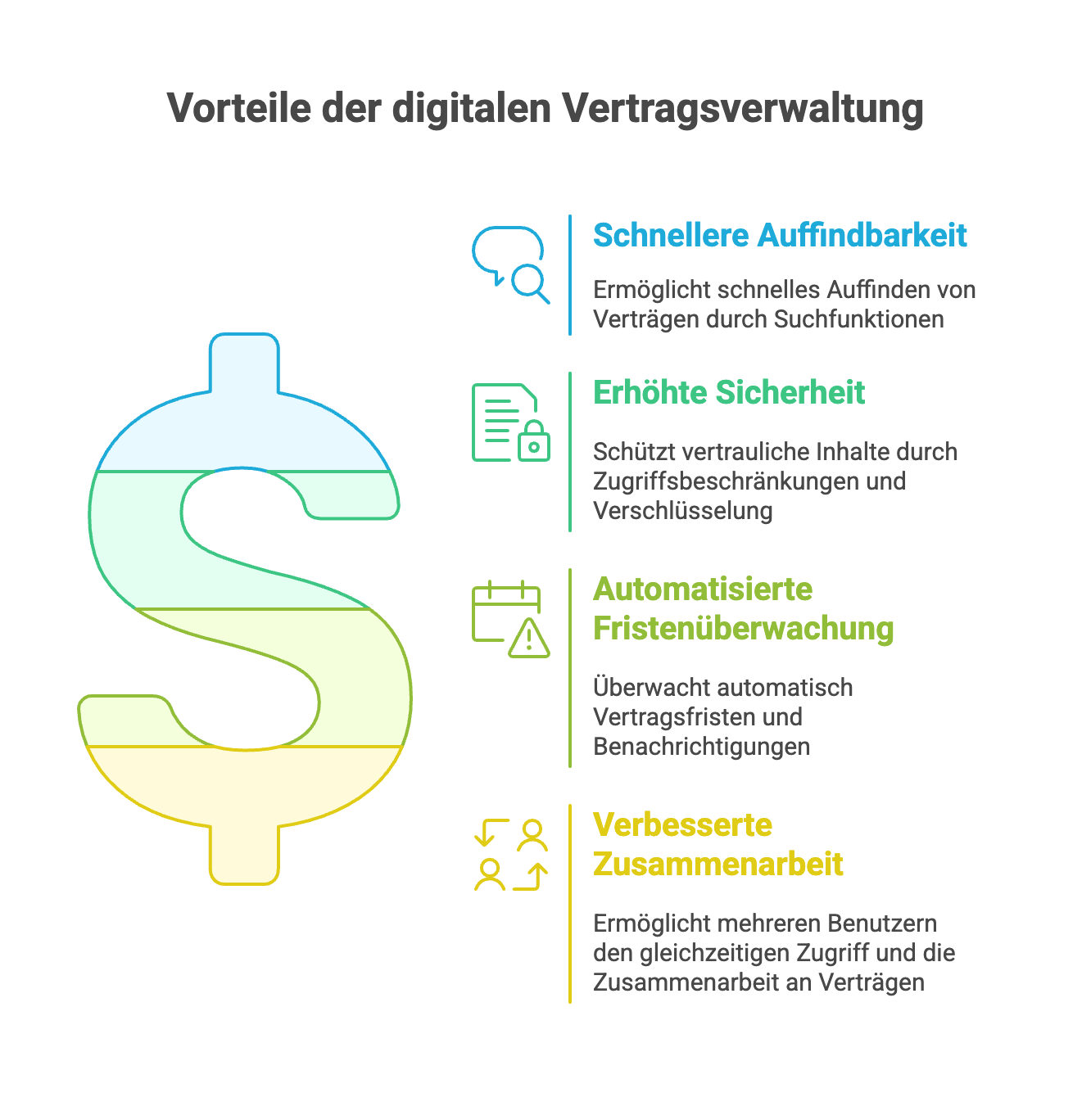
The advantages of digitalizing contracts are obvious — here are the most important at a glance (including digital contract archiving):
- Faster retrievability: Contracts can be found in seconds via search function, instead of laboriously leafing through binders. A central digital contract archive ensures that all documents are stored in an orderly manner in one place and important information is immediately available. This way, no more time is lost on lengthy searches.
- Higher security and compliance: Digital contracts can no longer be lost so easily or accidentally fall into the wrong hands. Access restrictions and encryption keep confidential content protected. In addition, compliance with data protection and legal requirements (e.g. GDPR) becomes easier, as it can be precisely traced who accessed a contract and when. Backups and audit-proof archiving provide additional security.
- Automatic deadline monitoring: Contract management tools automatically handle the monitoring of termination deadlines, renewal options, or expiration dates. You will never miss an important deadline again — the system reminds you in good time via email or dashboard of upcoming deadlines. This way you avoid contractual penalties or unwanted renewals and keep all dates under control.
- Improved team collaboration: Digitalizing contracts also means that multiple authorized employees can access current contract documents at the same time — regardless of location and home office. Collaboration is made easier because everyone always works with the same up-to-date version. Comments or changes can be traced digitally. Especially in times of remote work and distributed teams, it is a great advantage to have contracts available at any time and from anywhere.
4. How contract digitalization works – step by step
If you want to take the step of digitalizing your contract filing, a structured approach is recommended. The following step-by-step guide has proven itself in practice:
- Record and review the contract inventory: First, get an overview of all existing contracts. Collect all contracts from folders, cabinets, or drives, and check which documents are current, relevant, or worth archiving. This inventory helps to bring order to the chaos, avoid duplicates, and set priorities (digitalize important active contracts first).
- Scan contracts and convert them into searchable PDFs (OCR): In the next step, paper documents are digitalized with a document scanner. Pay attention to good scan quality (so that all details are legible) and convert the files into searchable PDFs using OCR (Optical Character Recognition). OCR makes it possible for the text in the contract to be digitally recognized — so you can later search for terms. Many scanner software programs or document management systems offer OCR automatically. Important: spot-check whether the digital copies are complete and legible before you possibly dispose of paper originals.
- Use of a DMS or contract management tool: Now the digital contract PDFs need a home. This is where either a document management system (DMS) or specialized contract management software comes into play. Upload all scanned contracts into the system of your choice. A DMS such as DocuWare offers general archiving functions for documents of all kinds, while contract management tools (e.g. top.legal or Legito) often bring additional functions specifically for the contract lifecycle. It is important that the system is reliable, secure, and accessible to your team — whether as a local solution or in the cloud. You can find an overview of the best contract management solutions here.
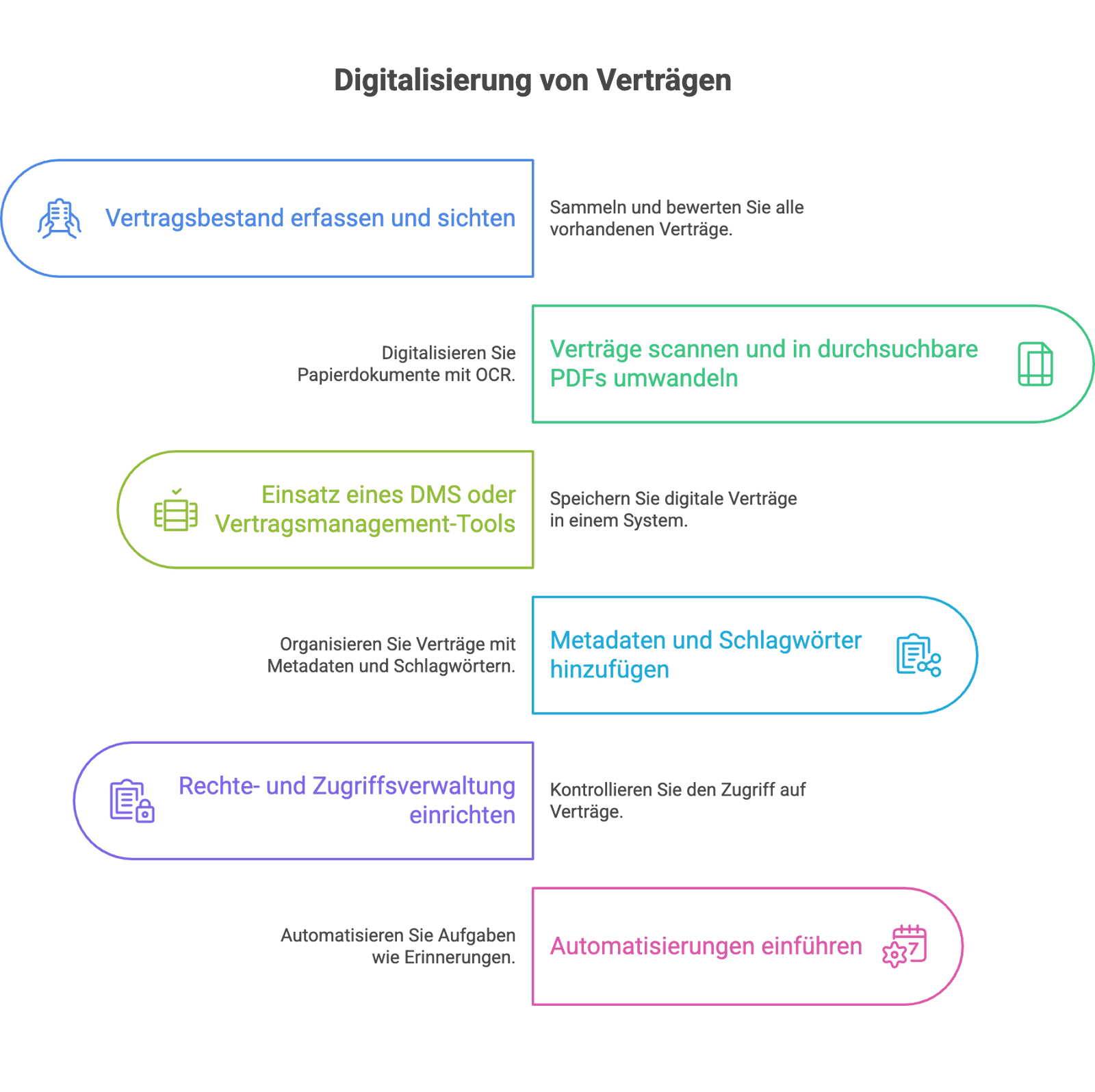
- Add metadata and keywords: In the digital system, you should now provide each contract document with the relevant metadata. This includes, for example, contract type, contracting parties, date of contract conclusion, terms, termination deadlines, financial volumes, or responsible internal contact persons. Through tags/keywords, you can additionally categorize contracts (such as "rental contract", "customer contract", "supplier", etc.). This structured information makes finding and evaluating contracts significantly easier later on. Invest some time here — a clean data foundation pays off.
- Set up rights and access management: Define who in your company is allowed to access which contracts. In the software, access rights can be configured so that, for example, only the legal department and management can see all contracts, while individual specialist departments can only view their respective contracts. Define clear roles and permissions (read, edit, approve) to ensure both security and efficient work. Good rights management ensures that confidential content remains protected and each user only sees what they are supposed to see.
- Introduce automation (e.g. reminders): Use the possibilities of digital contract management to automate routine tasks. Set up reminder functions for deadlines, for example: the system can automatically send emails when a contract needs to be renewed or terminated. Follow-ups for contract reviews, automatic task lists for responsible parties, or even templates for recurring contract types are also among the automation possibilities. The goal is to reduce manual steps and ensure that no important process is overlooked. Start with simple automations — these can later be expanded as needed.
5. Typical challenges – and how to solve them
As you can see: digitalizing contract management brings immense benefits, but it does not run by itself.
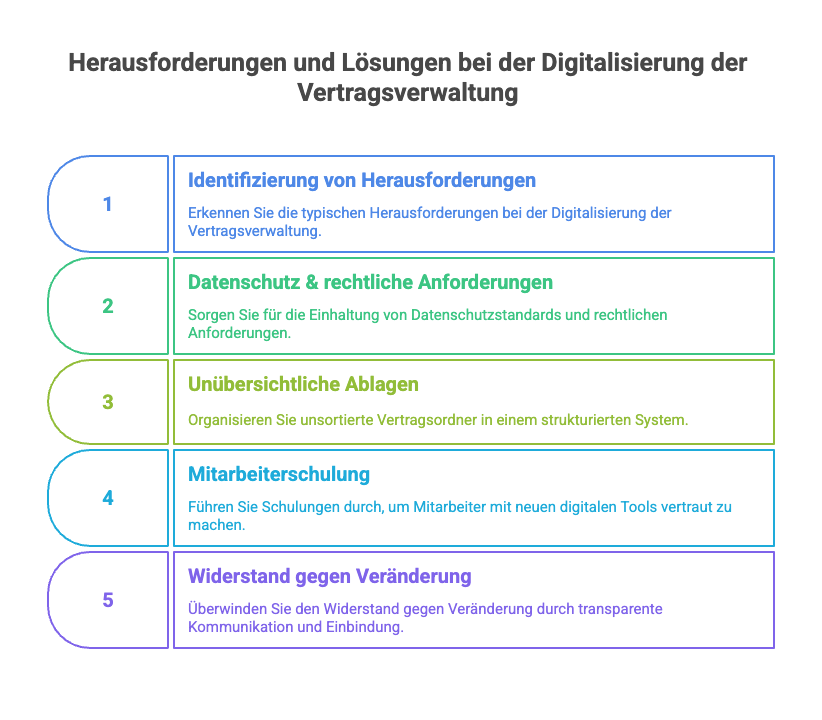
In the transition process, challenges often arise that must be mastered. The good news: for every challenge there are solutions. Let's look at some typical problem areas and how to overcome them:
- Data protection and legal requirements: Contracts contain sensitive information. Many companies worry about whether digital storage is secure and legally compliant. Solution: Choose software that meets the highest security standards (encryption, two-factor authentication) and complies with GDPR requirements. Pay attention, for example, to server locations in the EU, access controls, and audit-proof archiving. With the right partner, you don't need to fear data protection violations — on the contrary, digital systems often enable better control over access than an open filing cabinet.
- Disorganized filing systems: When contract folders have grown unsorted over decades, digitalization initially feels like sorting the proverbial "mountain of paper." Where do you start? Solution: Proceed step by step. First, define a clear structure for the digital filing system (e.g. by contract type or business area). Sort out existing contracts before scanning (duplicates and old contracts that have already expired can perhaps be archived or disposed of). You don't have to manage everything at once — prioritize important current contracts. A fixed structure and naming conventions for digital files help to keep even large contract inventories organized.
- Employee training: New software and processes are not always met with immediate enthusiasm. Employees may be unsure about how to use the DMS/contract management tool or continue to rely on paper out of habit. Solution: Plan training and sufficient onboarding time from the outset. Explain the benefits of digital contract management to your colleagues and demonstrate practically how the new solution works. It often helps to train so-called key users — that is, contact persons on the team who are particularly well-versed and can help with questions. With easy-to-understand software and a bit of training, employees will quickly come to appreciate the advantages (less search effort, easier collaboration).
- Resistance to change: Sometimes the digitalization process runs into a fundamental change management problem. "We've always done it this way" — this attitude must be overcome. Solution: Ensure transparent communication within the company. Clearly convey why the change is necessary and what benefits it brings to each individual. Involve employees early on, for example by gathering feedback on the choice of software or designating pilot users. When the workforce realizes that digital contract management is not an end in itself for the IT department but makes their daily work easier, acceptance will rise. Success stories from other areas of your company or from the industry can also be convincing.
Conclusion on this challenge: With clear processes, a good software solution, and open communication, all of the above hurdles can be mastered. Every transition takes some time — but the effort pays off, because at the end of it stands a more efficient and secure contract workflow.
6. Tools and software solutions for digitalizing contracts
There are various tools and software solutions for digital contract management. Depending on company size and requirements, different approaches come into question. Essentially, three categories can be distinguished, which often also go hand in hand:
- Document management systems (DMS): A DMS is software for the central management of documents. Here you can scan, archive, and tag contracts with keywords. DMS solutions offer strong search functions and versioning for documents of all kinds. Many companies use a DMS as the basis of their digital document filing — not only for contracts, but also for invoices, receipts, etc. Example: DocuWare is an established DMS provider with which contracts can also be securely archived and managed. A DMS makes sense if you need broad document management and may already be digitally managing other document types.
- Contract management systems: Specialized contract management software (also known as contract management systems or contract lifecycle management) goes beyond mere filing. These tools cover the entire lifecycle of a contract — from creation through negotiation and electronic signing to monitoring fulfillment and deadlines. Functions such as automated contract templates, approval workflows, reporting on contract conditions, and collaboration features are often included. Examples: top.legal or Legito are modern, cloud-based contract management platforms. They make it possible to edit contracts in teams, sign them digitally, and centrally evaluate all contract data. Such systems are particularly worthwhile when many contracts are in circulation or complex processes (such as those involving legal departments and negotiation rounds) need to be mapped.
- Cloud solutions and simple digital filing: For smaller companies or for getting started, a cloud-based file storage with a clear folder structure is sometimes sufficient — e.g. via services such as SharePoint, OneDrive, or Google Drive — combined with a scanner and OCR software. It is also important here that access rights are properly set and data protection is ensured. The advantage of cloud-based solutions: they are quick to introduce, accessible from anywhere, and require no in-house server infrastructure. However, simple cloud storage does not replace a full-fledged contract management system, but offers a first step to at least make contracts digitally available. Many professional contract management tools, by the way, are also cloud solutions (software-as-a-service), which includes regular updates and maintenance by the provider.
What should you look out for when choosing? Three points are particularly important:
- Security: Pay attention to high security standards of the software. Contracts contain confidential data — therefore features such as access rights, encryption, backup, and certified data centers should be a matter of course. Also check whether the provider supports legal retention obligations and compliance (e.g. GoBD, GDPR).
- User-friendliness: The best software is of little use if it is barely used. An intuitive user interface and easy operation are worth their weight in gold so that all employees can quickly get along with the system. Test in advance whether the typical work steps (searching for a contract, creating a new contract, entering a deadline, etc.) are easy to handle. A short onboarding time promotes acceptance in the team.
- Interfaces: Contracts are often connected to other business processes. It is ideal if the chosen solution has interfaces to existing systems — e.g. to inventory management, CRM, ERP, or e-signature services. This allows data to be exchanged automatically (e.g. customer data from the CRM directly into the contract document) and avoids duplicate maintenance. Open APIs or integrations with common tools are therefore a plus.
In addition to the examples mentioned, the well-known tools in the field of digital contract management include DocuWare, top.legal, and Legito, among many others. It is worth comparing different solutions — also on factors such as price, scalability, and support. Every company has different requirements here: a startup may place more value on quick setup and low costs, while a legal department in a corporation looks for extensive compliance functions. Inform yourself, test demo versions, and choose the software that best fits your needs.
7. Digitalizing contracts – best practices from the field
What does digital contract management look like in concrete terms? Let's look at a brief practical story: the fictional Sample Ltd., a mid-sized company, had until recently stored contracts in paper-based folder structures. Offers, customer contracts, and supplier agreements were piling up in several cabinets. Deadlines were often missed because no one had an overview, and the effort to find an old contract again was great. Then management decided to digitalize contract management. First, all current contracts were reviewed and digitalized with a professional scanner.
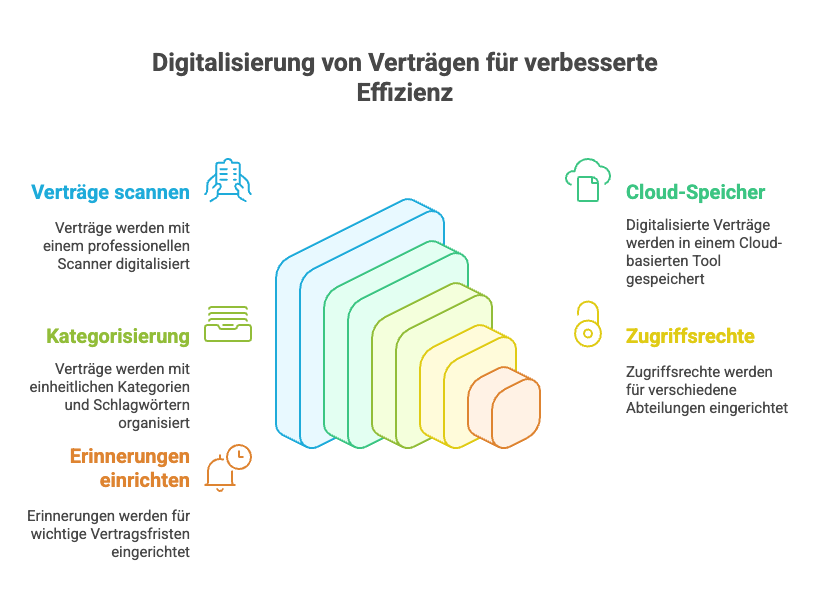
The documents ended up in a cloud-based contract management tool. The team defined uniform categories and keywords, set up access rights for sales, purchasing, and management, and configured reminders for termination deadlines. Within just a few months, success became apparent: contracts were now findable in seconds, no one forgot important renewal dates anymore, and collaboration between sales and the legal department ran more smoothly, since both could access the same information. The employees of Sample Ltd. do not want to go back to the old paper shuffling.
Several best practices can be derived from experiences like this. Here are a few tips for different target groups on how digital contract management can be successfully introduced:
- For SMEs: Start with a clearly defined project. Identify the most important contract types (e.g. customer contracts, supplier contracts) and digitalize these first. Look for a software solution that fits your budget — providers often offer special packages for small and medium-sized companies. Designate someone or a small team internally as responsible for contract management. This way it is clear who keeps the overview. Also let yourself be guided by positive effects: make savings in time and costs visible to further motivate management and employees.
- For startups: Young companies have the advantage that they can establish digital processes from the very beginning. Use this! Avoid paper contracts as completely as possible by relying on electronic signatures and cloud solutions. Choose an agile, scalable contract management platform that grows with your company — many tools are affordable or even free in the basic version and can be expanded later. Create a culture in which contracts are not seen as a tedious formality but as important knowledge documents. Document every new contract immediately in digital form, so that no chaos arises. This way, your startup also keeps the contract situation under control as it grows.
For legal departments: Legal departments in established companies often manage huge contract inventories and have to comply with strict compliance rules. Here, professionalism and integration capability are required. Make sure that the chosen software offers highly secure archiving and audit trails (logging of all actions) — in the event of audits or legal disputes, seamless evidence is worth its weight in gold. Train all colleagues on consistent filing and use of the system, so that legal documentation remains consistent. Use advanced features such as clause libraries or contract templates to standardize contract creation. And work closely with other departments: a good contract management system can build a bridge between the legal department, sales, purchasing, and management by providing everyone with the necessary information, without piles of signed contracts lying around anywhere.
Ready for the next step?
Book a demo with our team and see top.legal in action