
Create a contract step by step: from first draft to signature. Whether you write a contract yourself or automate it with software — nine steps for a legally sound contract process that works for legal and sales teams alike.
For most companies, a functioning contract process is a growth lever: more contracts closed means more revenue and higher earnings. Yet many organisations stumble when they try to build one. The result is lost deals, slow cycles and avoidable friction — often adding up to real money left on the table.
This guide walks through nine practical steps to set up a contract creation process that works, whether you draft in Word or automate with dedicated software.
What is a contract process?
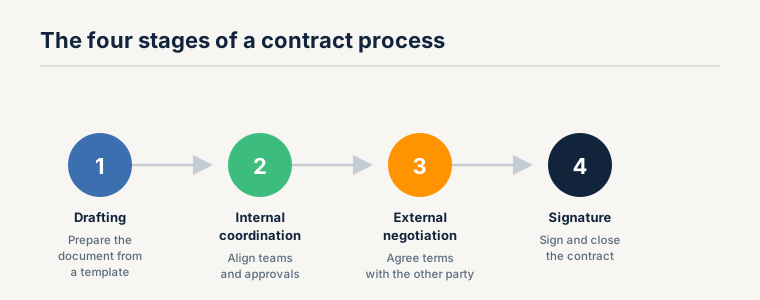
A contract process is the end-to-end path a legal document travels: drafting, internal coordination, external negotiation and, finally, signature.
Contract processes usually involve several teams across different departments — though in most companies the legal department has the final say. Gathering input and approvals has to run smoothly, otherwise contracts stop moving the business forward and instead become a bottleneck.
The tips below explain how to streamline that workflow and stop contracts from clogging your internal processes.
Can I create a contract myself?
Yes. Under the principle of freedom of contract, you are generally free to draft contracts yourself — in most business situations, involving a lawyer is not a precondition for the contract's validity. Many companies still hand contract creation to external lawyers by default and pay high advisory fees for it, especially smaller firms without an in-house legal team.
The catch: anyone who wants to write a contract themselves needs to understand both the general and the contract-type-specific requirements. Faulty or ambiguous wording can render individual clauses — or the entire contract — void. This is exactly where vetted templates and contract automation software come in: they provide a continuously updated foundation that already meets the essential requirements of the relevant contract type. Your team then focuses only on the actual negotiation points, and the need for legal advice shrinks to a minimum — or disappears entirely for standard contracts.
Which mandatory components a legally sound contract must contain is covered in our contract drafting basics, and how to phrase individual clauses cleanly in our guide to drafting a contract — or you can let AI produce the first draft. The nine steps below show how to set up the creation process itself — in Word or via software — cleanly.
1. Define clear roles and responsibilities
Whether you already run dedicated contract automation software or still rely on familiar tools like Google Docs or Microsoft Excel, one thing is essential: a clear allocation of responsibilities and roles. Every participant should know exactly what they are authorised to do and what the next step in the process is.
When roles are undefined, contracts stall, people overstep their authority, and unnecessary friction creeps in.
To keep the process running smoothly, you should be able to answer the questions below. In italics we've added the typical answers we see day to day:
- Who owns the contract templates? The legal department
- Who creates contracts from these templates? The sales team
- Who approves contracts before they go out? Sales and/or legal
- Who negotiates the contracts? Sales for smaller amounts; legal and sales leadership for larger ones
- Who signs contracts, and when should they be brought in? Company officers or managing directors are often the authorised signatories
2. A good contract template is half the battle
The second key step is to prepare your contract templates carefully. If you want a fast contract process, build your templates around rules. In practice, it helps to colour-code the different scenarios and add short explanations directly in the template. Don't forget to set it to read-only so the master template doesn't get overwritten in the rush of a live deal.
Leave explanations of each clause in the document — using square brackets or footnotes — so that even colleagues without legal training can put a contract together confidently.
If you already use contract automation software, such as top.legal, you can go further and work with embedded placeholders. Free-text inputs from employees are then dropped straight into the right spot in the contract as it's generated, while the rest of the document stays locked down.
Modern software also lets you store alternative clauses for negotiation scenarios in the template. Typically, the clauses you don't use don't have to be deleted before the next use, and multiple dependent clauses can be added with a single click.
3. Explain the template clearly
Once your templates cover the main scenarios, take the time to explain them to your internal users and external customers.
Give the other party the chance to understand the contract as they read it. This spares them frustration and cuts down on the back-and-forth questions that so often slow a deal.
Modern software can display these explanations as the contract is created, making the options more transparent, and can offer external parties extra information in plain, non-legal language. That makes it noticeably easier for counterparties to sign.
Even if you only use a conventional word processor, use the comment function to make the contract easier for the other side to follow.
4. Keep current templates easy to find
Your sales team should always have the latest templates within a few clicks. If finding the right template is a chore, people fall back on whatever they used last — which is not necessarily the current version. Make the up-to-date templates the path of least resistance.
5. Set up a clear approval process
Trust is good; control is better. The quickest way to get both is a clear approval process. Make approvals as granular as you need — but no more, so you don't over-complicate the workflow.
For example, the relevant business unit or management should own and sign off on the commercial terms, while legal reviews and approves the legal terms. That way it's always clear who is responsible, and important points don't slip through the cracks.
To keep things running smoothly, everyone involved should be able to see where a contract stands. That lets each team plan its resources and keep some capacity in reserve for busy periods.
Email is the wrong tool for this. After a few days of email overload, everyone tunes out — and important contracts get lost in the noise.
A simple Kanban board works far better. Each contract is a card, so managers and department heads can see at a glance how many contracts sit at each stage. Many CRM systems include capable, flexible Kanban boards; free tools like Trello or Notion work well too.
The advantage of Kanban over email-driven processes is obvious: no inbox flood, a clear overview, and easier planning. You can also formally hand a contract to the next person responsible and distribute tasks along the way.
6. Make signing as frictionless as possible
Many companies still default to the handwritten signature — even though, since the EU's eIDAS Regulation took effect in July 2014, it is no longer required for every document.
A handwritten signature is a cumbersome procedure. Contracts have to be printed, signed and posted. And if you cut corners — scanning the signed page and emailing it to save the trip to the post office — you turn a legally robust handwritten signature into a far weaker simple electronic signature, while still bearing the cost and effort of printing and signing.
Make it as easy as possible for your customers. Don't give them time to reconsider — seize the moment. Let them sign whenever and wherever suits them, using an electronic signature on a phone or other portable device.
7. Think beyond the signature
Renewals are a post-signature activity and therefore really a matter of contract management rather than the contract process itself. But the important deadlines are already known before signing, so plan for them from the start.
Missing a deadline — or an automatic renewal clause — can be costly. Your company can lose significant sums if promised services or products aren't delivered on time. So make it part of the process that every deadline from a signed contract is logged in a central calendar, with timely reminders to the team responsible for delivering.
It's also good practice to record, in your process diagram, who is responsible for capturing those deadlines.
If you already use contract software, deadline reminders are usually handled automatically: everyone involved receives an email notification so nothing important slips.
8. Keep improving your contract process
Even a carefully designed, well-rehearsed process can hit snags — a difficult clause, or a tricky counterparty. A team might sit on a contract for days without touching it, or the same point gets renegotiated again and again, dragging the process out.
When that happens, act quickly and fix the process — every delay is money out the door. Watch for the problems that keep recurring and address them early.
Contract automation software can support this analysis, but even a simple Kanban board will show you where your process burns the most time. Dig into it.
9. Take the first step
A few simple changes — often just a clear allocation of responsibilities — are enough to produce a noticeable improvement in your contract cycles. Start there.
Frequently Asked Questions (FAQs)
What is the contract creation process?
The contract creation process is the end-to-end path a contract takes from first draft to signature. It covers drafting the document, coordinating internally, negotiating with the other party and obtaining approvals, and finally signing. A well-defined process keeps contracts moving instead of stalling between teams.
Can I create a contract myself without a lawyer?
Yes. Under freedom of contract, you can generally draft contracts yourself, and in most business situations a lawyer is not required for a contract to be valid. The important part is meeting the general and contract-type-specific requirements — vetted templates and contract automation software make this far easier by providing a compliant, up-to-date foundation.
What makes a contract creation process efficient?
Clear roles, well-prepared and easy-to-find templates, a defined approval process, transparent status tracking (a Kanban board beats email), and frictionless electronic signing. Contract automation software ties these together by generating contracts from vetted templates and routing them through approval, deadline tracking and signature automatically.
Do I need software to create contracts?
No — the nine steps in this guide work in Word or Google Docs. But software removes the manual overhead: it stores templates and clause libraries centrally, generates contracts in one click, enforces approvals, and tracks deadlines and signatures, so everyone works from a single, current version.
Ready for the next step?
Book a demo with our team and see top.legal in action