
Is Excel suitable for contract management? We cover the real benefits, the concrete limits, and when it pays to switch to dedicated contract management software.
It is easy to see why Excel spreadsheets are so popular for managing contracts. Excel templates are usually free or inexpensive, easy to use, require little training, and don't force you to introduce new processes. Even so, one important question emerges: can you really entrust your most essential contract documents to a spreadsheet?
In this guide, we look at the real benefits and the concrete limits of managing contracts in Excel — and the point at which dedicated contract management software becomes the better choice.
The benefits: when Excel is good enough for contract management
For small teams with only a few contracts, Excel has genuine advantages:
- Low cost: Excel is already installed in most companies, so there are no extra licence fees.
- Familiar to everyone: almost anyone can read and update a spreadsheet without training.
- Flexible: columns, formulas, and filters can be adapted freely.
- Fast to start: a first contract overview is set up in minutes.
If you only need to keep track of a handful of contracts, a clean spreadsheet works well at first. For a practical, step-by-step approach, see our guide to building an Excel contract tracker.
Why Excel templates run into limits for contract management
At first glance, Microsoft Excel looks like an easy way to manage contracts: everyone enters data, shares it, and edits it as needed. That's why spreadsheets are often the first, natural choice for many companies.
But as useful as Excel is, the risks of managing contracts in a spreadsheet shouldn't be underestimated. Here are the four most serious ones.
1. You lose the overview of all your contracts
A single spreadsheet may be tidy at the start. As the number of contracts and data fields grows, it quickly becomes confusing. Often several versions of the same file exist on different workstations — and no one is sure which one is current.
Keeping contract details, deadlines, contacts, and documents together in one file becomes tedious. The result: no single, reliable view of your entire contract portfolio.
2. Spreadsheets are prone to errors
Contract management in Excel depends on manual upkeep — and that is exactly what drives the error rate up. A wrong value, a shifted row, or an overwritten formula often goes unnoticed for a long time. Unlike dedicated software, Excel won't warn you when an implausible value is entered. A single spreadsheet mistake can be enough to damage trust you spent years building.
3. Excel is a security risk
Contracts contain highly sensitive data. Excel offers no real safeguards: spreadsheets are easy to copy, alter, and forward, and password protection is quickly bypassed. There is no fine-grained access control and no audit-proof history of who changed what and when. For confidential contract documents, that is a serious compliance risk.
4. Deadlines and obligations get missed
When a contract expires, it's time to renegotiate or terminate. Excel gives you no support here: spreadsheets don't send automatic notifications when a contract deadline is approaching. To avoid missing renewals, you have to review the data manually — which is time-consuming and error-prone.
Excel or contract management software? A quick decision guide
When does switching pay off? As a rough guide: once you run more than 20–30 active contracts in parallel, several people work on the same contracts, or deadlines and renewals come up regularly, the drawbacks of Excel start to outweigh its convenience. At that point, dedicated software pays for itself in saved time and avoided risk.
The better alternative to MS Excel
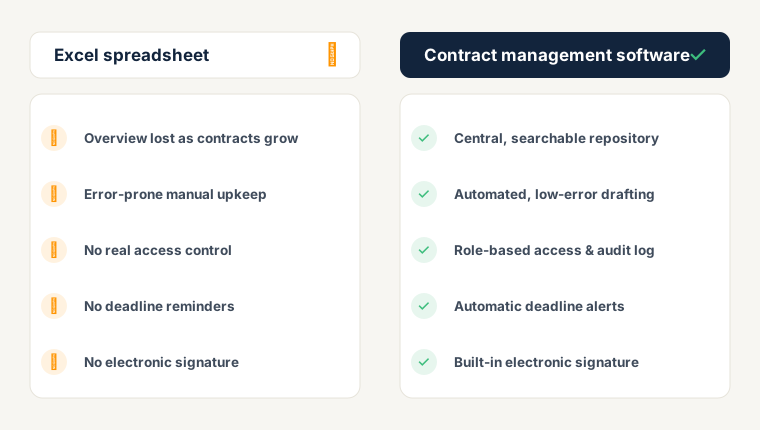
Contract management software automates and tracks the entire contract process through one central system. As a contract moves through its lifecycle, all information updates automatically — which reduces manual data entry and speeds up the whole process. Compared with Excel spreadsheets, it has five decisive advantages.
1. Every version and change at a glance
Contract management software gives you a secure, centralized contract repository. Contracts are easy to search, the right people can access them quickly, and every change is documented and traceable. Building that central repository is far easier than with spreadsheets — see our guide on how to create a contract database.
2. Precision instead of human error
The software automates the core steps of contract creation. Instead of typing a contract by hand, data is pulled from various sources and inserted into templates automatically: placeholder fields are filled correctly and the right clauses are added. This happens before anyone even edits the document, which all but eliminates typos and transposed figures.
3. Substantially stronger data security
Business contracts contain everything from personal customer data to trade secrets. Contract management with the right software is far more secure than any spreadsheet: you authorize access per person, control permissions through roles, and log every access in an audit-proof way.
4. No more missed deadlines
Instead of monitoring deadlines manually, the software handles automatic notifications and reminders. You record each upcoming action once, at the start, and are reminded in good time. Missed renewals and notice periods become a thing of the past.
5. Sign contracts electronically, right away
Excel can neither send warnings nor start approval workflows. Contracts have to be printed, signed, and scanned. Contract management software, by contrast, integrates the electronic signature directly: customers, suppliers, and third parties sign securely and promptly, complete with automatic email notifications.
Frequently asked questions about contract management in Excel
Can you manage contracts with Excel?
Yes — for a few contracts and small teams, Excel works as a starting point. You can record contract data, deadlines, and contacts in a spreadsheet. As the number of contracts grows, however, you hit limits in overview, security, and deadline tracking.
What are the biggest drawbacks of Excel for contract management?
The four main weaknesses are: a lost overview once you have many contracts, a high error rate from manual upkeep, weak data security without real access control, and no automatic reminders for deadlines and renewals.
When should you switch from Excel to contract management software?
As a rule of thumb: at around 20–30 active contracts, once several people collaborate on contracts, or when deadlines and renewals come up regularly. At that point dedicated software saves more time than it costs.
Is Excel secure enough for contract management?
Only to a limited extent. Excel offers no fine-grained access control and no audit-proof change history. For sensitive contract data, specialized software with role-based access and logging is considerably more secure.
Ready for the next step?
Book a demo with our team and see top.legal in action