
A practical guide to integrating CLM software with your CRM, ERP, e-signature and business systems — the connection methods, a four-phase roadmap and what to evaluate first.
Managing a growing pile of contracts is hard enough. Managing it across a CRM, an ERP, a signing tool and three spreadsheets that never quite agree is harder. This is exactly the problem contract lifecycle management (CLM) software is meant to solve — but only if it connects properly to the systems you already run. Before you integrate CLM software into your IT landscape, it pays to understand how those connections work and what to plan for.
In short: CLM software delivers most of its value once it is integrated with the tools around it — CRM, ERP, e-signature, HR and identity systems. You can connect them through native connectors, an open API or an iPaaS middleware layer. Plan the integration in four phases — map, connect, migrate, adopt — and evaluate compatibility, scalability, usability, security and e-signature support before you commit.
What CLM software is, in one minute
Contract Lifecycle Management (CLM) software is a platform that centralises and automates every stage of a contract — request, drafting, negotiation, approval, signature, ongoing management and renewal or termination. Instead of scattering that work across email, Word and shared drives, it keeps every version, obligation and deadline in one searchable place.
For the full picture of what the category does and how to choose a tool, see our guide to contract management software. This article focuses on the part teams underestimate: getting that platform to work with the rest of your stack.
According to Gartner, contract lifecycle management software can cut contract cycle time in half, reduce administrative overhead by 25–30%, and improve compliance by up to 55% — gains that depend heavily on the software sharing data with your other systems rather than becoming another silo.
Why integration is where the value is
A CLM platform that stands alone still saves time on drafting and storage. But the biggest wins come from integration — when contract data flows automatically to and from the systems your teams live in.
- No duplicate data entry. A signed deal in the CRM creates the contract record; the executed contract updates the CRM. Nobody re-keys customer names, values or dates.
- One source of truth. Contract values, renewal dates and obligations stay consistent across sales, finance and legal instead of drifting apart in separate tools.
- Faster cycles. Approvals, signatures and hand-offs happen inside existing workflows rather than in a separate app people forget to open.
- Reporting you can trust. Contract performance analytics are only as good as the data feeding them — integration keeps that data current.
Which systems a CLM integrates with
Most CLM integrations fall into a handful of categories. The platform sits at the centre and exchanges data with the systems that create, consume or govern your contracts.
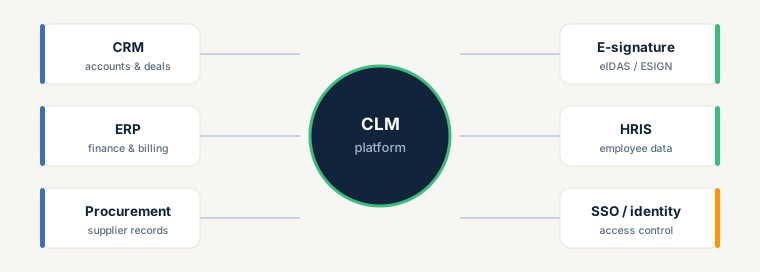
- CRM (e.g. Salesforce, HubSpot): ties contracts to accounts and opportunities so sales sees contract status without leaving the CRM.
- ERP (e.g. SAP, NetSuite): links contract terms to billing, revenue recognition and financial reporting.
- Procurement / supplier systems: connects supplier contracts to onboarding and spend management.
- E-signature (eIDAS / ESIGN): lets contracts be signed inside the workflow — more on this below.
- HRIS: feeds employee and org data into employment and NDA templates.
- SSO / identity providers: centralises access control and provisioning so the right people reach the right contracts.
How CLM systems connect
There are three common ways to wire a CLM into your stack. Most real deployments use a mix.
- Native connectors. Pre-built integrations the vendor maintains (e.g. a Salesforce or HubSpot app). Fastest to set up and the lowest maintenance — check the connector list before you buy.
- Open API. A REST API lets you build custom integrations for systems without a native connector, and control exactly what data moves and when. This needs developer resource but offers the most flexibility.
- iPaaS / middleware (e.g. Zapier, Make, Workato): connects a CLM to many systems through a low-code integration layer — a good middle ground when you have several tools but limited developer time.
A four-phase integration roadmap
Treat integration as a project with clear stages rather than a switch you flip on go-live day.
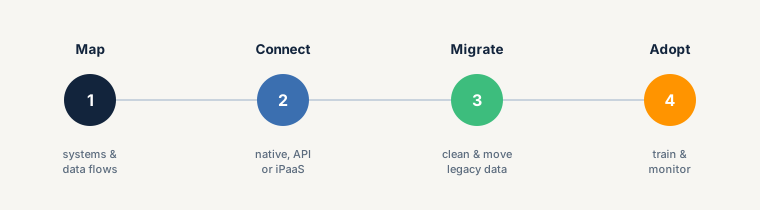
- Map — document which systems hold contract-relevant data, and which fields need to flow in which direction.
- Connect — choose the connection method per system (native, API or iPaaS) and configure the data mappings.
- Migrate — clean, standardise and move legacy contracts into the new system. Poor data quality here undermines everything downstream.
- Adopt — train users, run the old and new processes in parallel briefly, and monitor that data is flowing as intended.
What to evaluate before you integrate
1. Compatibility with existing systems
Assess how the CLM works with your ERP, CRM and other core platforms. Compatibility ensures information moves cleanly between systems without interruptions or inconsistencies. If the CLM can't sync with your CRM, for example, you risk errors in customer records and missed upsell opportunities. Involve your IT team or vendor early to spot gaps and plan for custom connectors, field mapping or system updates.
2. Scalability and flexibility
Your CLM should grow with you. As contract volume and variety increase, the platform must keep pace without losing speed or ease of use, and adapt to changing processes and regulations. Look for configurable workflows, templates and approval chains, and support for many contract types — from simple sales agreements to complex vendor and lease contracts. Choosing a scalable, flexible tool helps you avoid costly migrations later.
3. User-friendliness and training
Adoption makes or breaks any rollout. If the CLM feels complicated, people work around it. Prioritise a clean interface, intuitive navigation, drag-and-drop editing, customisable dashboards and strong search. Pair that with thorough training and ongoing vendor support covering both the basics and advanced features, so your team gets full value from the platform.
4. Security and compliance
Contracts hold sensitive data — financials, intellectual property and personally identifiable information (PII). Your CLM should offer data encryption, role-based access controls and audit trails, and comply with regulations such as the GDPR in the EU and the CCPA in the US. Regular security assessments and certifications like ISO 27001 give additional assurance that contract data stays protected from unauthorised access or alteration.
5. Integration with e-signature solutions
Electronic signatures make signing faster, paperless and easier to track — so built-in e-signature is a core integration, not a nice-to-have. Signing directly inside the CLM saves time while keeping signatures legally valid. Confirm the software complies with ESIGN in the US and eIDAS in the EU, and that it supports the signature types you need: Standard (SES), Advanced (AES) and Qualified (QES), each offering a different level of assurance.
Common integration challenges
Knowing the obstacles up front makes them manageable:
- System compatibility: conflicts between platforms, databases and applications already in use. Resolve with a compatibility review and, where needed, custom connectors.
- Data migration: moving legacy contracts accurately requires cleansing, standardisation and formatting before the move.
- User adoption: resistance to change and unfamiliar workflows slow rollout — training and good collaboration tooling help.
- Security: protecting contract data during and after integration needs encryption, access controls and regular audits.
- Cost and resources: budget realistically for licensing, customisation, implementation and ongoing maintenance.
FAQ
Does CLM software integrate with CRM and ERP systems? Yes. Most CLM platforms integrate with major CRM (Salesforce, HubSpot) and ERP (SAP, NetSuite) systems through native connectors or an open API, keeping contract, customer and financial data in sync automatically.
What is the best way to integrate CLM software? It depends on the system. Use a vendor's native connector where one exists (fastest, lowest maintenance), the platform's open API for custom needs, and an iPaaS layer like Workato or Make to connect several tools with limited developer time.
How long does a CLM integration take? A native connector can be live in days; API-based or heavily customised integrations with data migration typically take several weeks to a few months, depending on the number of systems and the state of your legacy data.
Can a CLM integrate with e-signature tools? Yes — and it should. Look for built-in e-signature that complies with eIDAS (EU) and ESIGN (US) and supports SES, AES and QES signature levels, so contracts can be signed inside the workflow.
Ready for the next step?
Book a demo with our team and see top.legal in action