
Electronic Signature. Signed by the right people, every time.
Electronic signatures integrated directly into your contract workflow — from negotiation to close. Your signing policy decides who has to sign — applied before the signature request goes out, not discovered afterwards.
No more printing, scanning, hoping.
 With top.legal
From draft to signature in four steps.
Create or import
Generate a contract from a template or import an existing document. Release for pre-review.
Negotiate & approve
Agree on terms in the deal room. Run the internal approval process before the signature is released.
Configure & trigger
Set signature standard, sequence and field placement. Merge documents if needed. Trigger with one click.
Verify & archive
All parties sign in sequence. QR-verified, audit-trailed and automatically stored in your contract archive.
Nobody has to work out who is allowed to sign.
Signing authority usually lives in a policy document nobody reads at the moment it matters. Codify it once and every contract answers the question itself — from its own value, against your own rules.
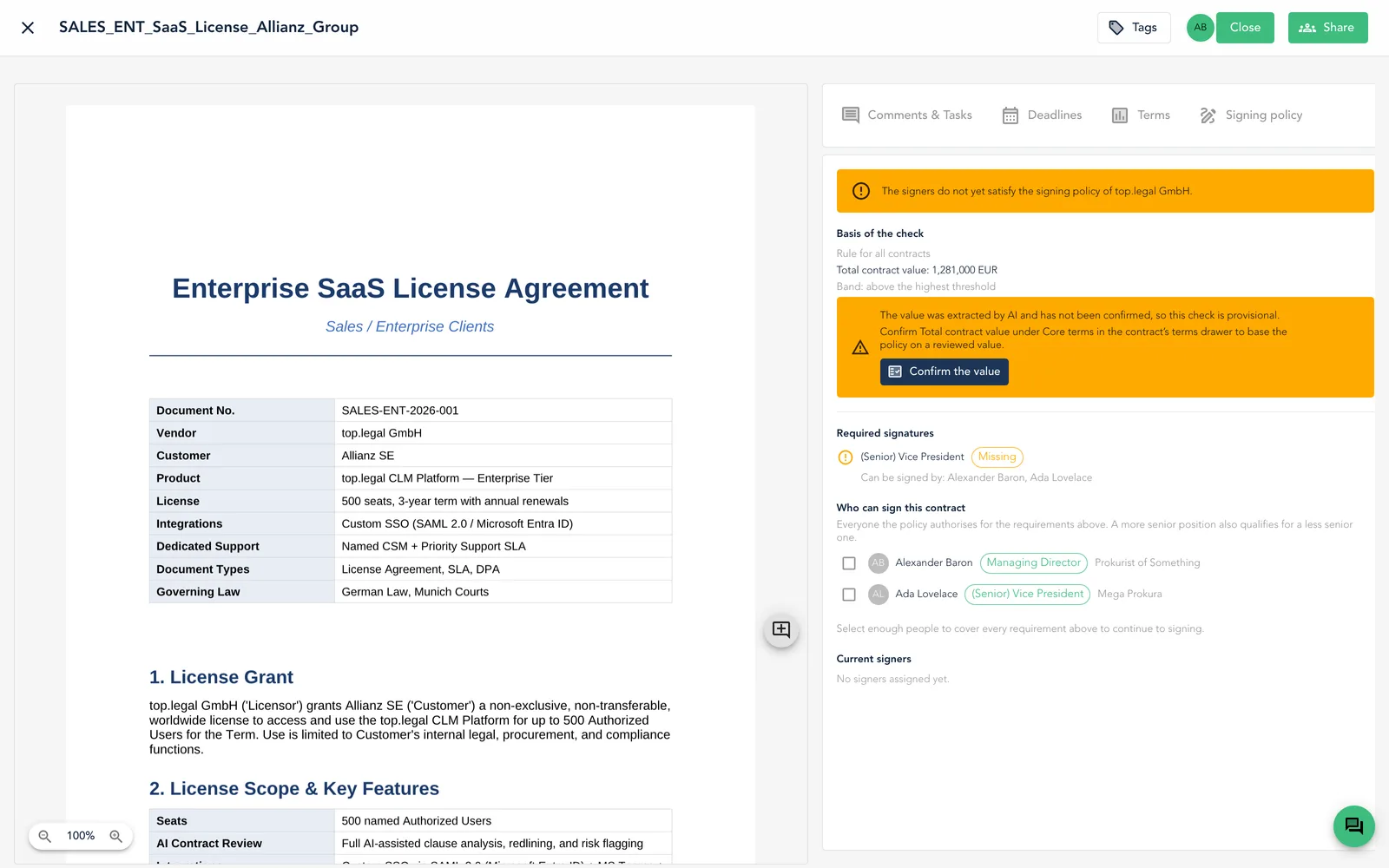
It reads the value
AI extracts the core terms of every contract, including its total value — the figure your signing rules are driven by
It applies your rules
The value decides which threshold band applies, and the band decides which positions have to sign
It names the people
Everyone your policy authorises for that band is listed by name, ready to be added to the signing process
Your signing policy, codified on the legal entity itself.
Each of your legal entities carries its own policy — the positions authorised to sign for it, and the value bands that decide how many of them are needed.
- Rules reference positions, not people — when someone changes role, the policy still holds
- Value bands set the threshold where a second signature, or a more senior one, becomes mandatory
- A more senior position also satisfies a less senior requirement
- A breach either warns or blocks signing outright — you decide per entity
Group structures keep separate policies per entity, so a subsidiary never inherits signing rights it does not have.
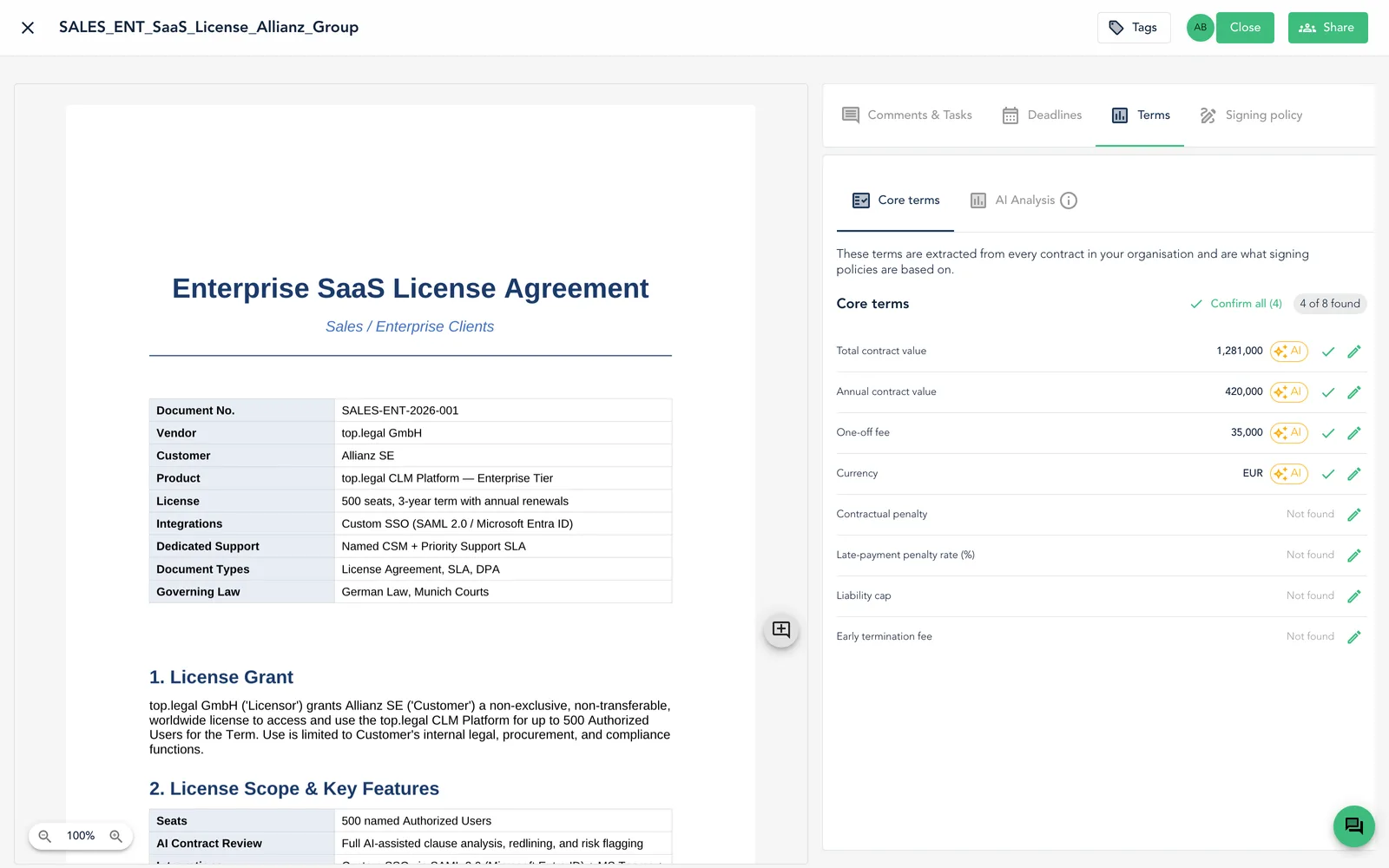
The value that decides the signature comes from the contract.
Upload a signed or negotiated document and AI reads its core terms — total contract value, annual value, one-off fees, currency. Those same terms are what your signing policies are based on, so the two can never drift apart.
Extracted, not typed
No one transcribes the contract value into a form for the policy to read
Provisional until reviewed
An AI-extracted value is flagged as provisional, and a person can confirm it before the policy relies on it
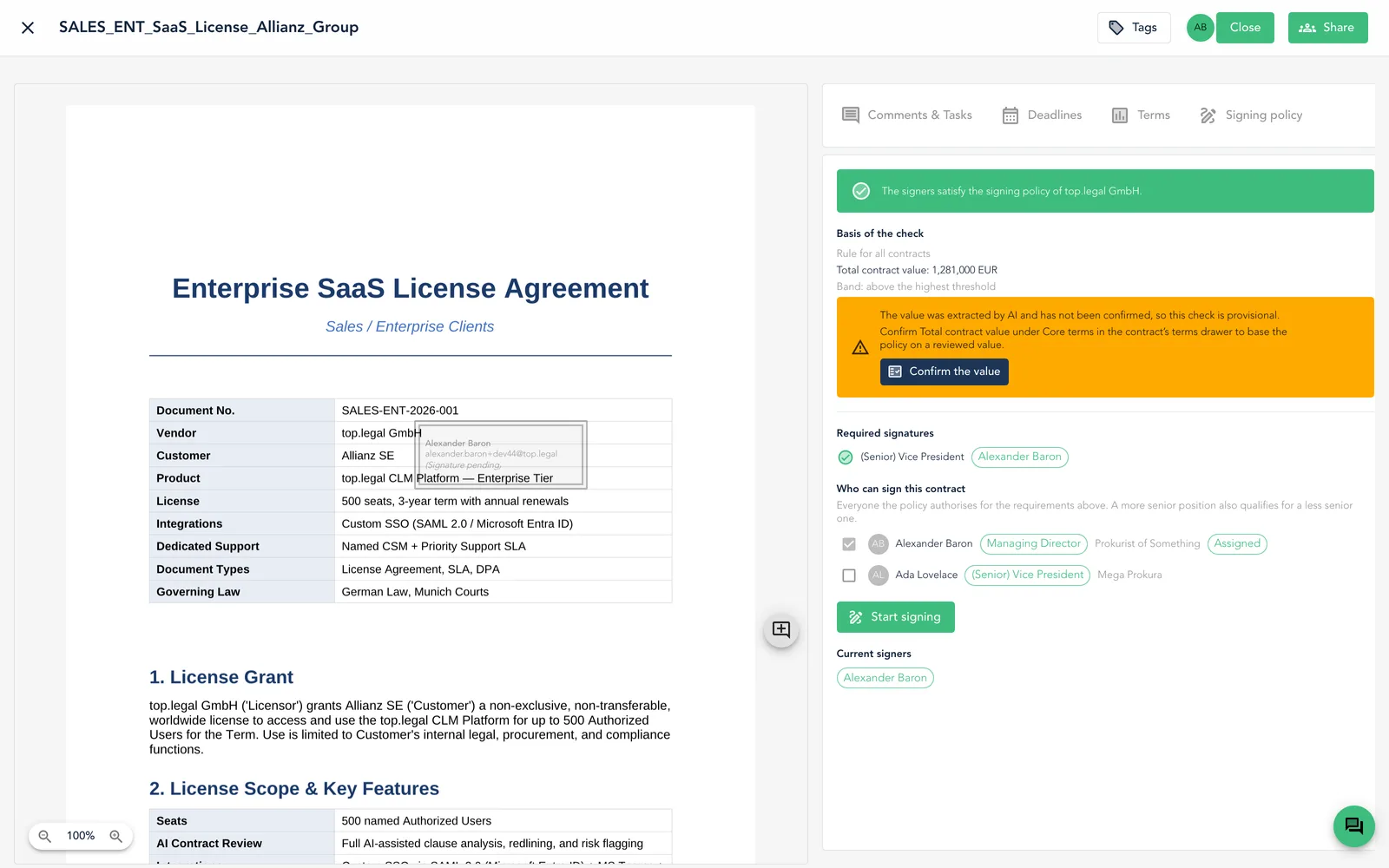
Tick the people the policy proposes and signing starts.
The signing policy tab lists everyone authorised for this contract. Select them and they are added to the signing process as signers — no separate step, no chance of inviting the wrong person.
Initialled on every page before anyone signs.
A reviewer confirms they have read the contract, and their initials are added to every page — the signal to the signees that a competent person has been through it.
- Pick the letters, a handwriting font and where they sit — the preview shows exactly where they will land
- A reviewer cannot also be a signer — the two roles stay separate by design
- Each page carries the initials plus a dated review reference
Initials record that the document was reviewed — they are not signatures, and they never replace one.
Sign it in your own hand or in a font — both equally binding.
Draw your signature with a mouse, trackpad or touchscreen — or type your name and choose a font. The choice is yours and has no impact on the legal validity of the signature.
- Drawn once and saved, so the next contract takes a single click
- The signature stamp records your function, your legal entity and the signing date
- Sealed with the top.legal AES signature standard
Some jurisdictions require the legal authority to appear beside the signature — that is what the function field is for, for example ppa.
Proof that it was signed the way your policy requires.
The same check that guided the signature stays on the contract afterwards. Once everyone has signed it stops being a preview and becomes the record: who signed, in which position, and against which rule.
One verdict, one evaluator — what the contract shows you and what an audit would conclude can never diverge.
Legally secure from the start.
Choose the right signature standard, lock down approvals and guide every party safely through the process.
Choose signature standard
Choose between the simple (EES), advanced (FES) or qualified (QES) electronic signature — matched to the legal requirement of your document
Release documents for review before signing
Let the counterparty review the full document before the signing process begins — fewer surprises, fewer follow-up questions.
Pre-signature reviewNegotiate, then sign seamlessly
Agree on terms in the deal room, then go straight to signing — without leaving the platform. The agreed final version is automatically locked.
Zero FrictionApproval gate before signing
Add a structured approval step upfront: internal stakeholders review and approve — only then does the signing process start automatically.
Approval gateScalable, precise, fully traceable.
Control volume, sequence and filing logic — from the first invitation to the verified signature.
Single or bulk sending
Send 200 contracts at once with a click, or route a single confidential agreement with custom configuration.
Flexible volumesPlace signature fields freely
Drag & drop: place signature fields exactly where they belong — for every signer, every time.
Precise placementInvite internal co-signers
Add colleagues, managers or executives as internal co-signers. Full control over role and authentication level.
Internal collaborationSet signing order
Define the exact sequence — aligned with your internal approval policy. Nobody can sign until the previous step is complete.
Merge documents, sign once
Bundle multiple documents into one signing package. Trigger once — all documents are executed together.
One trigger, all docsVerify signature by QR code
Every signed document carries a unique QR code. Scan it at any time to confirm validity and the full audit trail.
Your infrastructure. Your keys.
Use the native top.legal signature or connect the external provider your team already trusts. Maximum data sovereignty included.
Bring Your Own Key (BYOK)
Maximum data sovereignty. Bring your own encryption keys — only you can decrypt your signed documents. For organisations where data control is non-negotiable.
Supported external providers
Skribble
Swiss QES provider with the highest legal validity in the EU and Switzerland.
Adobe Sign
Globally trusted e-signature platform integrated directly into your top.legal workflow.
YouSign
European e-signature solution with strong eIDAS compliance and data-protection standards.
top.legal Native
Use the built-in signature engine without any external third-party dependency.
FAQ
An electronic signature is a digital method to confirm a person's identity and express their consent to a document. It replaces the handwritten signature and is legally binding in most cases.
Yes, electronic signatures are legally recognised in the EU under the eIDAS regulation and in many other countries under equivalent laws. top.legal supports all three levels of electronic signature under eIDAS.
There are three levels: the simple electronic signature (SES), the advanced electronic signature (AES) and the qualified electronic signature (QES). Each level offers a higher degree of security and legal enforceability.
Our electronic signature uses state-of-the-art encryption technology and is fully compliant with European data protection and security standards. Every signature is cryptographically secured and timestamped.
top.legal is optimised for all devices. You can sign documents conveniently on your smartphone, tablet or desktop computer — anytime and from anywhere.
The entire signing process typically takes just a few minutes. You receive an email with the document, review the content and place your signature with a few clicks.
You can sign almost any type of business document electronically — from employment contracts and NDAs to purchase orders, lease agreements and cooperation agreements.
Electronic signing is included in all top.legal plans. Contact our sales team for individual pricing tailored to your needs.
No more printing. Start closing.
Join hundreds of teams that have replaced their paper-based signing process with top.legal. Setup takes minutes — and the first signature is free.