
Contract management software compared for 2026: the 10 best CLM tools with strengths, ideal use cases, pricing, and AI features for legal, sales, and procurement teams.
Contracts are more complex than ever in 2026 — contract management is increasingly becoming a challenge for companies of every size. Long email chains, version chaos, and scattered documents cost valuable time and increase the risk of errors. Modern tools promise relief here: they automate workflows, keep an eye on deadlines, and centralize everything in one place. This article presents ten of the best contract management software solutions of 2026 and shows how they combine innovation, efficiency, and data protection.
If you want the fundamentals first — what the software does, the contract lifecycle it covers, and the features to look for — read our full contract management software guide. This article is the shortlist: who each tool is for, where it shines, and where it falls short.
Why contract management software matters in 2026
Managing contracts efficiently has long been a strategic success factor. Studies show that poor contract processes cost companies an average of 9.2% of their annual revenue — whether through missed deadlines, lost revenue, or legal risk. Automation and AI play a key role in 2026 in meeting these challenges. By now, around 90% of all enterprise software solutions have embedded AI features — contract automation has thus become standard in modern business processes. That means routine tasks such as contract creation, approvals, or reminders about notice periods increasingly run automatically. This saves teams time and reduces sources of error.
At the same time, data-protection requirements are rising. The GDPR forces companies to store confidential contract data securely and to control access strictly. Contract management tools help here by offering compliance features — such as role-based permissions, audit trails, and EU-compliant hosting options. Tracking contractual obligations and deadlines is also simplified, which minimizes legal risk.
Beyond automation and data protection, further trends are shaping contract management in 2026: cloud and remote work call for collaborative solutions in which internal and external parties can work together in real time. Electronic signatures are long established and speed up closings. AI-supported analytics even promise to evaluate contract data proactively and to spot risks or opportunities early. In short: modern contract management software is now indispensable for keeping an overview in a dynamic, legally demanding environment and for using contracts as value drivers rather than roadblocks.
Key criteria in the software comparison
Given the many providers on the market, you should watch a few core criteria when selecting contract management software:
- Usability: an intuitive interface is decisive so that your team actually adopts the tool. Complex software is of little use if it is not used day to day. Look for a clear interface and a shallow learning curve — ideally the solution can be deployed without weeks of training.
- Adaptability and scalability: every company has its own processes. The software should be flexibly adaptable to your workflows and grow with your business. Whether adapting templates, custom fields, or complex approval processes — a good solution can be configured rather than forcing you into a rigid schema. Equally important: it should scale for both a handful of contracts and thousands.
- Degree of automation: check to what extent routine tasks are automated. Templates, clause libraries, automatic deadline monitoring, and workflows can bring enormous efficiency gains. The more monotonous steps the software takes off your hands, the more your team can focus on substantive work. AI support for contract creation or review is a bonus that is increasingly common in 2026.
- Integration into the existing tool landscape: contracts never stand alone. Ideally, the contract management software fits into your existing systems — interfaces to CRM, ERP, DMS, or email ease data exchange and avoid duplicate work. Consider which integrations (e.g. Salesforce, Microsoft 365, SAP) matter to you so that contracts flow seamlessly through your business processes.
- Data protection and security: contract data is sensitive. Choose providers with high security standards — end-to-end encryption, regular security updates, backup strategies — and ones that explicitly guarantee GDPR compliance. Ideal are solutions with server locations in the EU and features such as role-based access rights to protect confidential information. Also check certifications (ISO 27001, SOC 2) a provider can demonstrate.
- Value for money: the cost should be in a healthy relationship to the benefit. Compare pricing models: some solutions offer tiered plans per user or per number of contracts, others flat packages. Also account for hidden costs — e.g. for additional users, modules, or support. A higher price can be justified if it significantly reduces manual work and legal risk. Free trials are recommended to test the value for money yourself — see our guide to evaluating a contract management software demo for the questions to ask and features to watch.
- Support and onboarding: last but not least, reliable customer support. Especially with business-critical contract management, you should be able to count on fast help when problems arise — whether by hotline, email, or chat. Training materials, tutorials, or onboarding services are also a plus, so the rollout runs smoothly.
These criteria help you select the solutions in the software comparison that best fit your requirements. In the next section, we look at ten top tools of 2026 and how they perform on these points.
Top 10 tools compared
Below we present ten leading contract management tools, their strengths, ideal use cases, unique selling points (USPs), and possible weaknesses. Each of these tools approaches contract management a little differently — from the start-up-ready all-rounder to the enterprise platform. top.legal is highlighted in particular, as it sets the standard in terms of innovation and efficiency.
For a deeper, feature-by-feature comparison of individual CLM providers, see our eBook CLM Provider Analysis.
top.legal
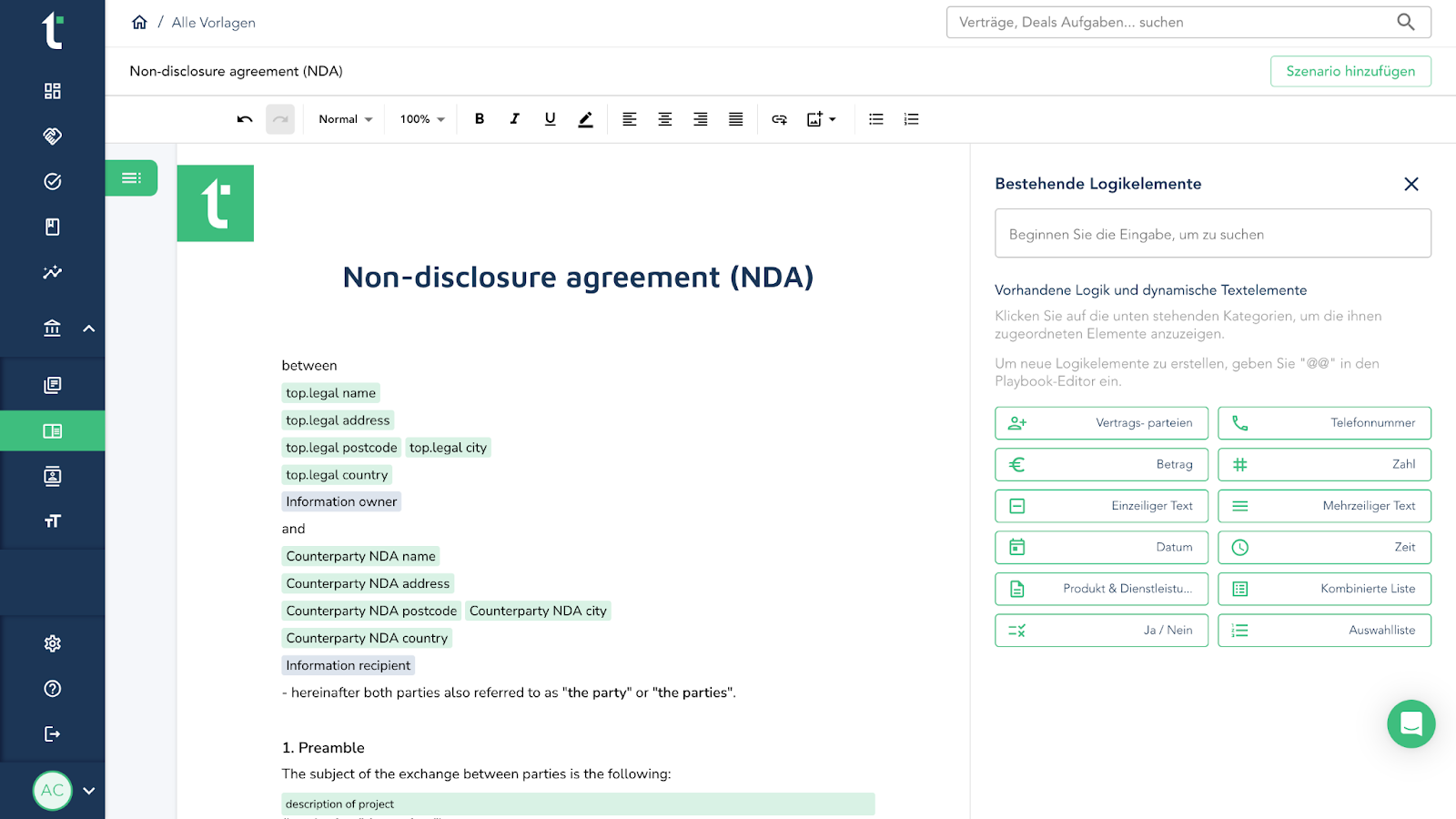
top.legal is a modern CLM (contract lifecycle management) platform from Germany that maps the entire contract process — from creation through negotiation and digital signature to archiving — in a single system. Its strengths lie above all in automation and AI integration: the tool has an intelligent contract assistant that automatically reads out key contract data such as deadlines or clauses and prepares it in the dashboard. This keeps teams on top of obligations without having to search manually.
A further plus is transparency in the negotiation process — all parties can see at any time whose turn it is, which reduces tiresome follow-ups and email ping-pong. E-signatures are seamlessly built into top.legal, so closings happen online, legally securely and quickly. Integration into common business systems (e.g. CRM) and an intuitive interface make onboarding easy. At the same time, top.legal advertises high cost efficiency, as it can replace several individual tools in the contract process.
top.legal is ideal for legal and sales teams in mid-sized companies that want comprehensive yet user-friendly contract management. Procurement teams also benefit from the real-time collaboration feature. Particular USPs are the strong AI support for routine tasks (contract drafting, analytics) and the focus on data protection — hosting in Europe and GDPR compliance are guaranteed. A weakness shows at most if you only needed a very simple contract repository without automation — then top.legal might be "too much" with its feature range (a simpler solution could suffice here). Overall, however, the advantages clearly prevail: top.legal combines cutting-edge features with a balanced value for money and thus advances to one of the leading tools of 2026 in this space.
ContractWorks
ContractWorks is a contract management solution from the USA, known in particular for its secure document storage and search functions. The tool is well suited to storing contracts centrally, finding them quickly again with OCR-supported search, and keeping deadlines or renewals in view with notifications. ContractWorks' strengths are its simple operation and focus on core functions: upload, tagging, reporting, and reminders work reliably. Thanks to AI features such as a GPT integration, contract content can be partly created automatically or clauses simplified. This increases efficiency above all for standardized contracts.
ContractWorks is ideal for SMEs or departments that have to manage many contracts and value security. With two-factor authentication and rights management, the tool scores on data protection. A USP is its fast implementation — the system is ready to use within a short time, without a months-long project phase.
One weakness of ContractWorks is the lack of its own contract creation editor within the system. For substantive redlining and editing of contract drafts, users have to fall back on external programs like Word. Advanced workflow automations (e.g. complex approval processes) are also only available in higher-priced packages. In addition, ContractWorks sits in the upper price segment (the standard version starts at around $700/month). For companies that primarily want a robust repository with reliable search and basic automation, however, ContractWorks is a proven option — secure, searchable, and efficient to manage.
Ironclad
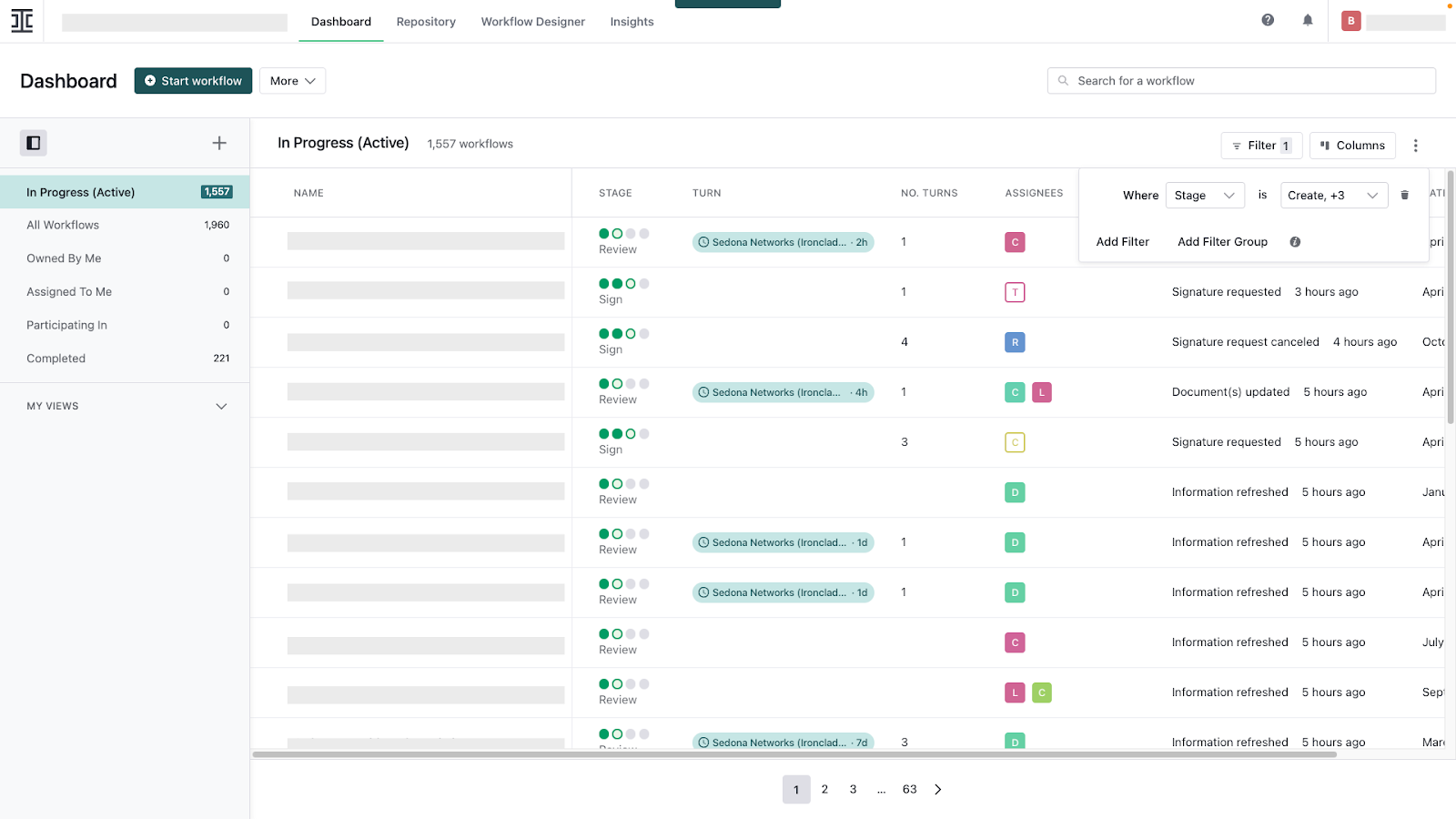
In recent years, Ironclad has made a name for itself as an extensive CLM platform designed specifically for legal departments in large companies. The system covers the complete contract lifecycle — from contract creation and negotiation with a collaborative online editor, through digital signatures, to tracking obligations. A particular strength of Ironclad is its powerful workflow automation: approval processes, templates, and AI-supported analyses run in the background, significantly reducing manual reviews. For example, Ironclad automatically detects key terms and risks in contracts and flags them for lawyers to check. This considerably relieves teams, especially with high contract volumes.
Ironclad is ideal for large companies and legal departments that manage many contracts in parallel and have high requirements for compliance and reporting. Integration into existing tools such as Salesforce is available, and the analytics functions give decision-makers valuable insights into contract values, terms, or bottlenecks. A USP of Ironclad is the combination of strong AI and legal finesse — the tool was developed practically "by lawyers for lawyers" to speed up contract work without giving up control.
The downsides of Ironclad are its comparatively high price and implementation effort. The solution is among the premium products on the market and often requires a technical setup of several weeks. Some users also report that adaptability for very specific requirements has its limits — for exotic contract processes, workaround effort is sometimes needed. Overall, however, Ironclad delivers one of the most advanced automation offerings and proves particularly superior when AI-supported contract management is strategically desired and the budget allows for corresponding investments.
Concord
Concord is a cloud-based contract management platform that puts simplicity and collaboration front and center. Its strength lies in the user-friendly interface and features that support distributed teams in particular: real-time editing of contracts directly in the browser, version control, commenting, and built-in eSignatures allow all parties — internal and external — to work on a document in sync. Concord thus covers the core of the contract process: from contract creation (also via templates and clause library) through negotiation to signature, everything runs on one central platform. Practical is the integration into common business tools; Concord fits, for example, into CRM systems to close sales contracts directly there.
Concord is ideal for mid-sized companies or teams that want an easy-to-learn tool to reduce the coordination effort around contracts. Sales, HR, or purchasing benefit from the fact that Concord requires little IT effort — according to the vendor, setup is possible in less than a day, which is considerably faster than with some enterprise solutions. A USP is Concord's "everything included, but kept simple" approach: unlimited storage, unlimited electronic signatures (at no extra cost), and transparent flat pricing set it apart positively.
On the flip side, Concord does not offer all the advanced functions that large corporations might expect. Automations and AI features are comparatively limited — Concord handles complex approval workflows or AI analyses of contracts less deeply. It also reaches its limits when it comes to adaptability to special cases (e.g. specific clause dependencies or spend tracking), because it is optimized for standard processes. For many everyday use cases that is perfectly sufficient, but anyone looking for a highly configurable system with sophisticated analytics will find it more in the larger CLM suites. Concord thus strikes a good middle ground between feature range and usability — ideal for companies looking for solid contract management without great complexity.
Juro
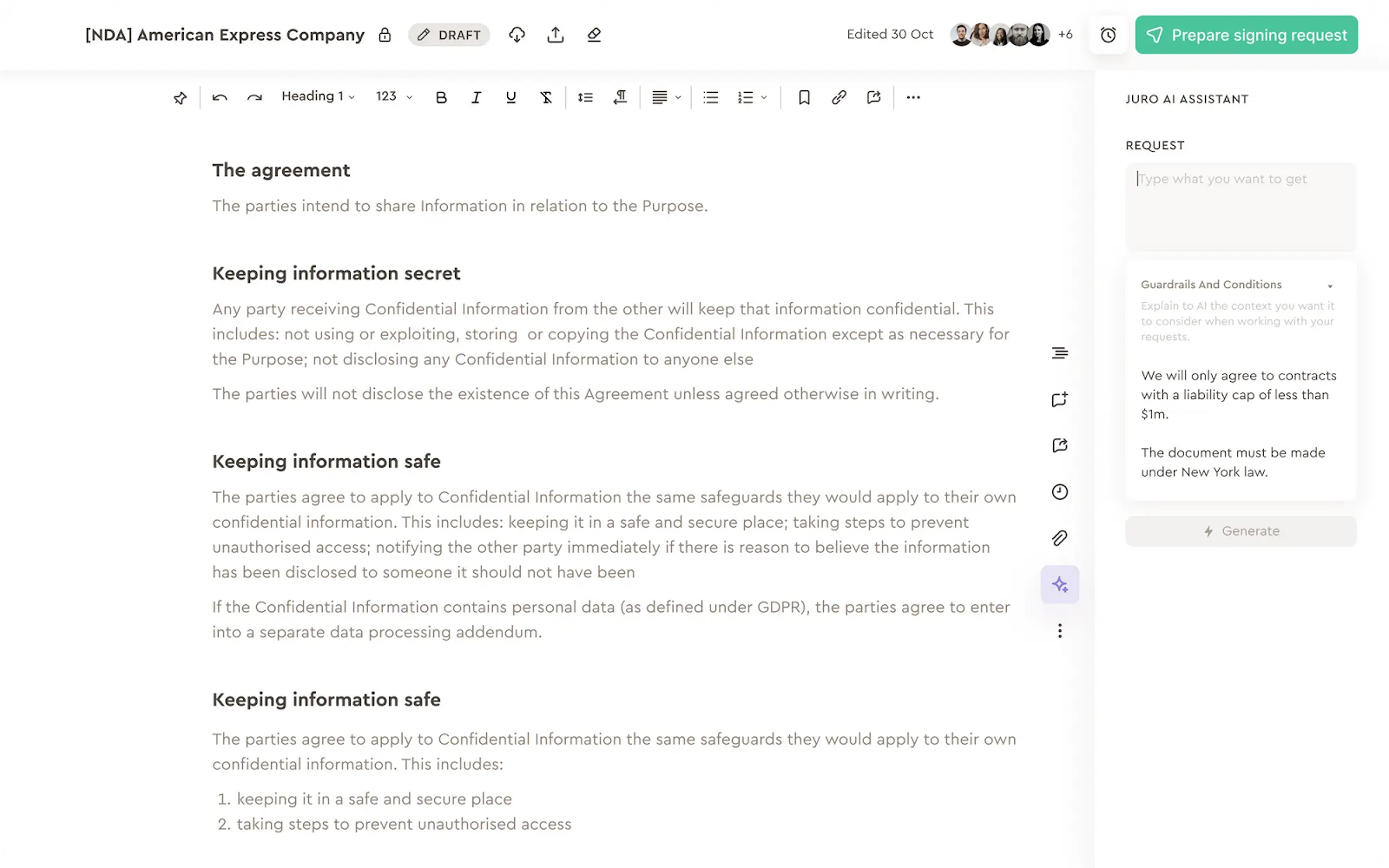
Juro is a contract management software developed in Europe (UK) that appeals above all to start-ups and agile companies. Known for its modern design, Juro relies on a completely browser-based contract platform with a focus on fast implementation and easy handling. Juro's strength lies in collaboration: similar to Google Docs, multiple users can work on a contract at the same time, leave comments, and track changes. Legal and commercial teams in particular benefit from this, as Juro was designed for both sides — legally watertight, but easy to use for business departments. With native e-signature and API integrations (e.g. to HubSpot or Slack), Juro fits well into the tool landscape of modern, digitally minded firms.
Juro is ideal for fast-growing companies that need to scale contract processes without introducing cumbersome enterprise software. The implementation effort is very low — according to accounts, teams often create their first contracts in Juro within a few days. A USP is the user experience: Juro is often praised for its clear, intuitive interface, which also appeals to non-lawyers. Juro has also begun to integrate AI elements (so-called "intelligent contract automation") to, for example, read out contract data or suggest clauses.
Juro is currently less suited to very complex contract handling as found in large corporations. Some functions are (still) not as mature — such as advanced reporting or deeper deadline and budget tracking. Large volumes of contracts can also slow the platform down somewhat. For a long time it also lacked true redlining versioning for external documents, which can be a drawback for complex negotiations (this function is, however, in development). In summary, Juro is excellent for start-ups, tech companies, and scale-ups that need a lean, fast contract solution — for very specialized requirements, however, it reaches its limits.
If you want to compare Juro specifically against concrete competitors, our Juro alternatives article weighs seven CLM tools side by side.
LeasingCockpit
LeasingCockpit is a cloud-based solution focused on contract and asset management around leasing, fleets, and assets (e.g. vehicles, machinery, or rented/purchased objects). At its core, it is less about legal document creation and more about transparency over terms, costs, and dates: contracts and assets are captured centrally, relevant data is stored in a structured way, and deadlines or recurring obligations (e.g. service/maintenance dates) are reliably kept in view through automated reminders.
LeasingCockpit is ideal for companies that have to steer many ongoing contracts/assets operationally — especially where, besides notice periods, term-accompanying obligations also play a role (e.g. appointments, inspections, services). Thanks to dashboards and a unified view of contract data, the tool is suited above all to teams that want to replace Excel lists and organize their contract and asset management pragmatically, quickly, and traceably.
As a possible limit: anyone looking for a full-featured CLM for complex legal workflows (e.g. highly collaborative contract creation, sophisticated clause libraries, deep redlining/negotiation) will tend to classify LeasingCockpit as a specialized management layer for ongoing contracts/assets. In return, it scores wherever overview, meeting deadlines, and cost control are the priority — including an uncomplicated start (e.g. a trial phase).
Agiloft
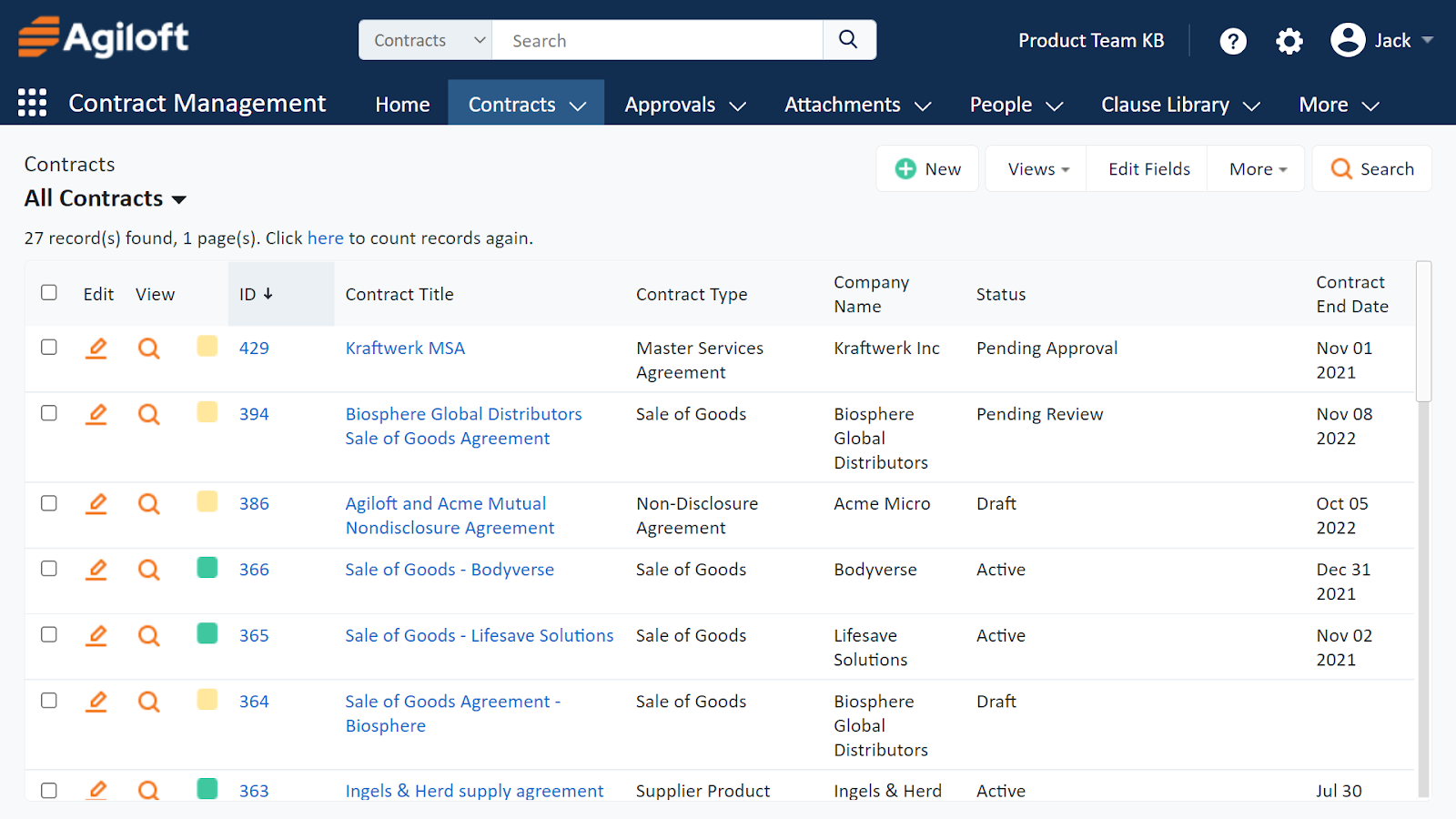
Agiloft is among the pioneers in contract management and stands out especially for its extreme adaptability. The solution offers a fully configurable no-code platform with which even the most complex contract processes can be mapped without programming. Dashboards, forms, workflows — everything can be adapted to the needs of the company. This flexibility makes Agiloft the first choice for organizations with very individual requirements. For example, specific approval rules, dynamic clause libraries, or mandatory fields for contract data can be set up entirely as desired. At the same time, Agiloft brings many functions out of the box: from contract creation through AI-supported natural-language search (to filter contracts by content) to reports and automatic reminders.
Agiloft is ideal for larger companies and public authorities that want to replace legacy systems while retaining maximum control over the new solution. Especially when existing contract management software is inflexible, Agiloft plays out its USP: changes to workflows or fields can often be made by the business department itself, without months-long IT projects — this saves time and cost. Agiloft is also valued for its strong integrations, such as with common CRM and ERP systems, as well as its robust security architecture (incl. detailed rights management and audit trails). AI comes into play at Agiloft, for example, in the form of intelligent clause comparison and contract recognition, which speeds up routine reviews.
As a weakness, users occasionally cite the interface, which is not quite as modern and intuitive as with newer competitors. The high flexibility also means that the initial setup can be complex — Agiloft offers many possibilities, but you first have to configure these, which requires a certain amount of familiarization. The learning curve is steep at first, but the system rewards you with almost boundless design options. In price terms, Agiloft sits in the upper segment and often works with individual quotes for enterprise customers. For companies looking for a tailor-made contract management solution and willing to invest in configuration and training, Agiloft is an excellent choice.
PandaDoc
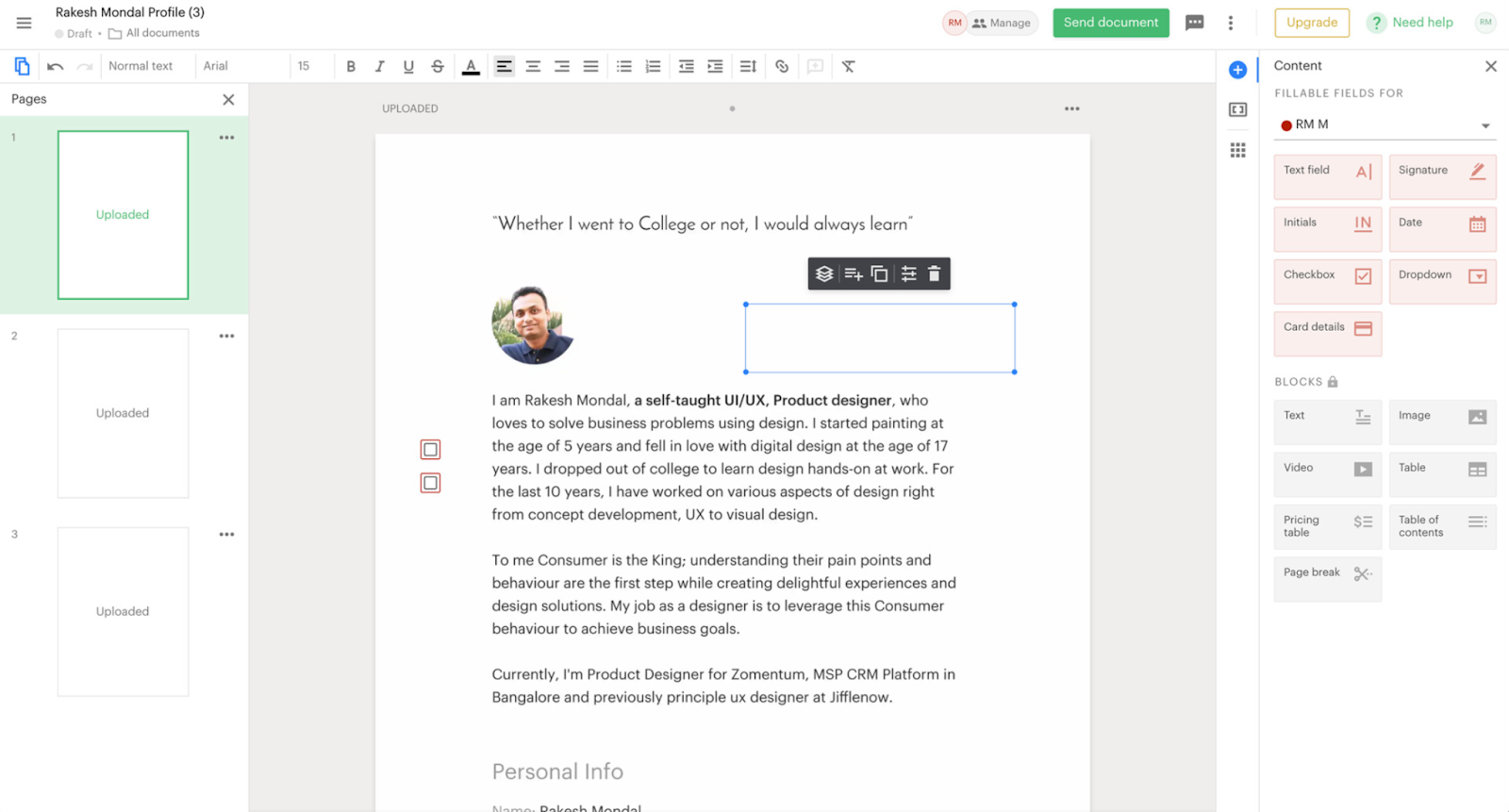
PandaDoc has its roots in the area of proposal and document creation and is today a popular tool for contract management at small companies and sales teams. The platform shines with a very user-friendly interface and a wealth of template-based functions. With PandaDoc, users can create, edit, and generate contracts from templates, which is particularly helpful in sales for quickly creating quotes and contracts for customers. Thanks to a drag-and-drop editor, text, prices, signature fields, etc. can be placed easily. PandaDoc integrates seamlessly with CRM systems like HubSpot or Salesforce, so quotes can be created and sent directly from customer opportunities. Once sent, built-in analytics provide insight into whether the recipient opened the document and which pages they viewed and for how long — a plus for follow-up negotiations. Of course, PandaDoc also offers e-signatures that are legally valid and convenient, including the option to collect multiple signatures.
PandaDoc is ideal for start-ups, small to mid-sized companies, and especially sales departments that want to process contract documents quickly and efficiently. The cost is moderate to low by comparison — there is even a free tier and cheap entry packages, which is why PandaDoc is often regarded as an inexpensive solution. A USP is the all-in-one nature of the tool: from quotes through contracts to invoices, a lot can be mapped in PandaDoc, so firms need fewer different tools. Moreover, implementation is virtually instant — you sign up and can get going without a big project.
PandaDoc's weaknesses lie in its limited depth for complex contracts. It is geared more toward standard contracts and processes. You will look in vain here for automated workflows or AI analyses of contracts. Functions such as sophisticated permission management or multi-stage approvals are also rudimentary, but not as powerful as with dedicated CLM systems. For strongly legal use cases (such as contract negotiations with many changes), PandaDoc is less suitable, as it is primarily a document-creation and e-sign tool. Nevertheless: for the fast closing of simple contracts — for example quotes, orders, NDAs — PandaDoc is hard to beat thanks to its simplicity and integration depth in the sales area.
DocuSign CLM
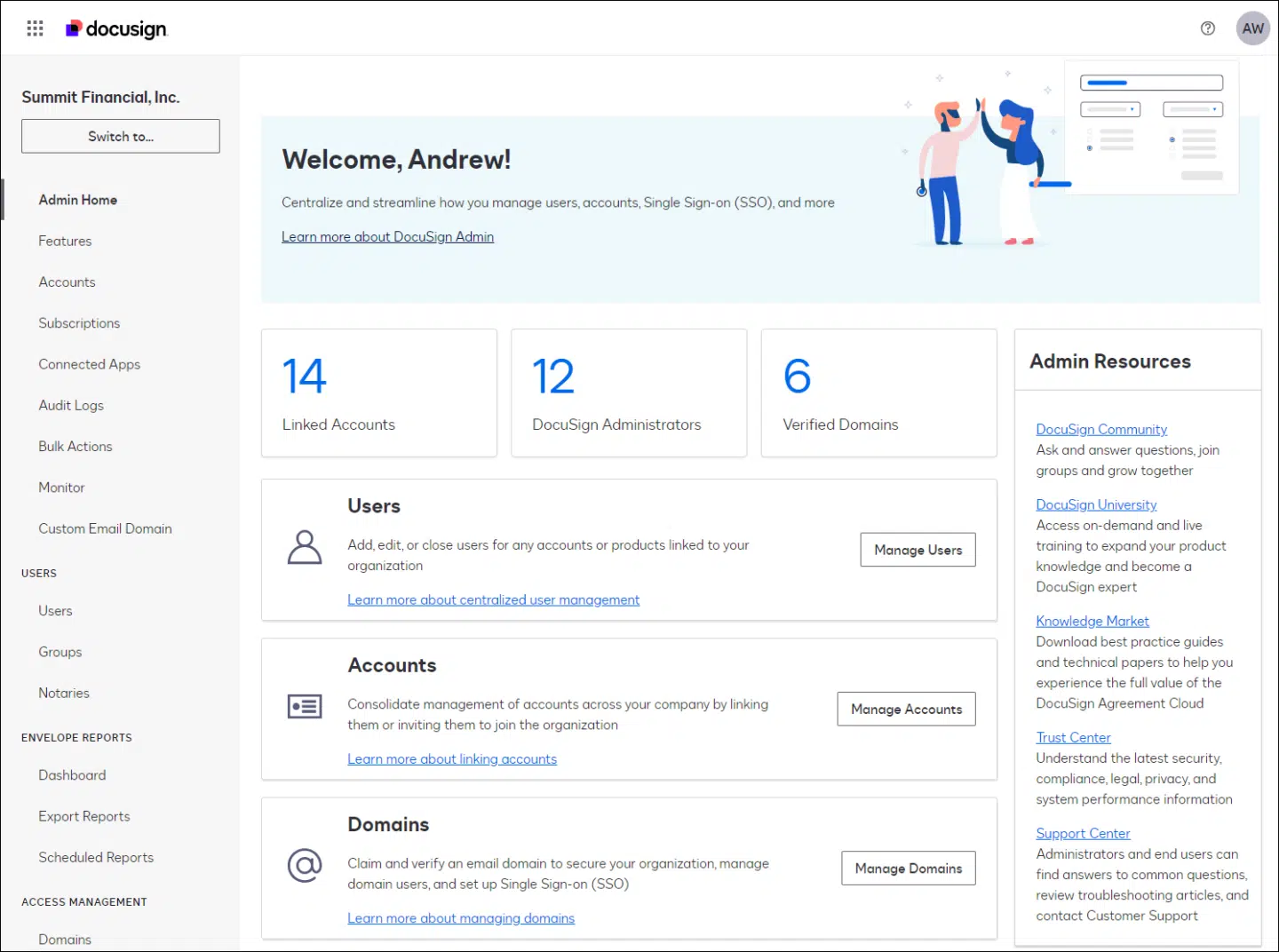
DocuSign CLM (Contract Lifecycle Management) is the extensive contract management solution from the well-known e-signature provider DocuSign. It is aimed primarily at larger companies that need complete lifecycle management of their contracts. DocuSign CLM builds on DocuSign's e-signature strength and adds functions for contract creation, workflow automation, versioning, and compliance. A big advantage is the seamless integration with the e-signature service: contracts can be signed directly in the system and the signed PDFs stored in an audit-proof way. DocuSign CLM scores with extensive features — from the clause library through rule-based approval processes to detailed analytics. Security is at enterprise level with encryption, audit trails, and a wide range of certifications. DocuSign also offers a broad ecosystem of integrations and API options, so that CLM can be embedded into CRM, ERP, or document management systems.
DocuSign CLM is ideal for large enterprises and internationally active corporations that manage high contract volumes and have to map complex processes (e.g. tiered approval processes, cross-border contracts, extensive compliance requirements). Legal teams appreciate the deep functions, such as automatic policy compliance through predefined clauses or the tracking of obligations after contract conclusion. A USP is its reliability and scalability: DocuSign CLM has been engineered for robustness and holds up even with thousands of contracts and users at the same time. Through acquisitions, DocuSign also has AI functions in its portfolio — for example contract analysis tools — that can be used additionally to detect risks or deviations in contracts.
The biggest downside of DocuSign CLM is the high cost as well as the implementation effort. The solution is usually significantly more expensive than mid-market tools and is therefore worthwhile above all if you really need the full feature range. For small companies it would be over-dimensioned — also because setup and training can be elaborate. In addition, some advanced AI analysis tools are not included in the standard scope but have to be licensed separately. Anyone who already uses DocuSign and wants to upgrade to an enterprise CLM, however, will find here an extremely powerful suite that leaves few wishes unfulfilled — from the first draft to archiving and analysis, DocuSign CLM covers everything you could want.
Contractbook
Contractbook is a Scandinavian tool (from Denmark) that positions itself as an all-in-one contract platform especially for start-ups and small companies. It enables the entire contract cycle in one application — from contract creation (via provided templates or your own) through digital signing to central storage. Contractbook stands out with a very clear interface and even offers a permanently free plan for small teams, which makes it attractive for getting started. All the important functions are present: contracts can be edited jointly, there is a clause library, automatic reminders about notice periods, and a solid search. Contractbook is particularly strong in reporting — users can filter and evaluate contract data to keep an eye on upcoming renewals or contract values, for example. In doing so, Contractbook takes care of GDPR compliance, stores data in the cloud (using European servers), and offers security features such as two-factor authentication.
Contractbook is ideal for small to mid-sized firms that quickly need a functional contract solution without a large budget. Through integrations with over 3,000 apps (via Zapier), Contractbook can be embedded into existing workflows — e.g. new folders can be created automatically in Google Drive or CRM entries updated when a contract is signed. A USP of Contractbook is the simple automation of post-processing steps: you can define so-called data flows that process contract information directly after signing (for instance for onboarding new customers). Signatures with Contractbook are also very flexible — besides the standard eSignature, the tool supports electronic identities such as the Danish NemID, which eases authentication.
As a weakness, Contractbook — similar to Juro — has certain limitations for very complex negotiations. It lacks, for example, advanced redlining functions to track changes in long contract documents in detail. Some powerful features (database feature, advanced automations) are also only available in higher-priced plans. Some users also report small stability bugs or that you sometimes have to refresh manually so that the latest changes become visible — these are, however, more temporary teething problems. Overall, Contractbook convinces as an affordable European alternative with a large feature range for everyday needs. For start-ups and SMEs looking for a fast entry into digital contract management, Contractbook is an excellent choice — and you can still switch to larger solutions later if needed.
Other specialized solutions
Besides the ten all-rounders, it is worth looking at three specialized providers that each cover a particular requirement especially well — from AI contract review to embedding in document management:
ContractHero
ContractHero is a German contract management software that specifically addresses mid-sized companies with high security requirements. The solution is fully GDPR-compliant and hosted on ISO-27001-certified German servers. Strengths are the tidy, intuitive interface (getting started works even without IT knowledge), digital contract management, deadline monitoring, a built-in contact database, and a recently integrated contract editor; AI functions help locate important clauses. Ideal for firms that manage many contracts in parallel and value data security and German-language support. For very complex, highly collaborative negotiations, the feature range lags behind the large CLM suites.
Legartis
Legartis pursues a focused approach: the Swiss company has specialized in AI-supported contract review and appears above all as an add-on to existing processes — for example as a plugin for Microsoft Word. The AI analyzes contracts (PDF or Word) in seconds and detects critical clauses, risks, and deviations from standard terms. For companies with high contract volumes, this means a considerable time saving in legal review. Legartis is less a complete CLM than a review layer that can be combined with other systems. Ideal for legal departments at large firms that want to uncover contract risks early and automate routine reviews.
DocuWare
DocuWare is an established provider for document management and workflow automation that also offers a dedicated solution for contract management. It is particularly suited to larger organizations that want to embed their contract administration in comprehensive document and process management. DocuWare combines a central, audit-proof contract archive with powerful workflows — from defined review and approval processes to e-signature. Its greatest strength lies in integration: connecting to ERP, accounting, and CRM systems embeds contracts seamlessly into the rest of the business processes. Ideal for corporations and administration-intensive industries (e.g. banks, insurers) as well as for companies that already use DocuWare for other document processes.
Feature comparison table
For a better overview, the following table compares central criteria of the tools presented. top.legal is highlighted, as it is especially convincing in many categories:
| Tool | Automation | E-signature | AI support | GDPR-compliant | Price tier |
|---|---|---|---|---|---|
| top.legal | High | Yes (built-in) | High | Yes (🇪🇺 servers) | €€ |
| ContractWorks | Medium | Yes | Medium | Yes | €€€ |
| Ironclad | High | Yes | High | Yes | €€€ |
| Concord | Medium | Yes | Low | Yes | €€ |
| Juro | Medium | Yes | Medium | Yes | €€ |
| LeasingCockpit | Medium | Partial | Low | Yes | €€ |
| Agiloft | High | Yes | Medium | Yes | €€€ |
| PandaDoc | Medium | Yes | Low | Yes | € |
| DocuSign CLM | High | Yes | Medium | Yes | €€€ |
| Contractbook | Medium | Yes | Medium | Yes | € |
Note: The price tier is based on publicly known rates for typical use cases. Actual costs vary depending on users, contracts, and desired modules. Many providers offer discounts for start-ups or individual enterprise quotes.
Once the choice is made, implementation follows: our eBook Successful CLM Software Implementation — A Guide for Project Owners shows how to set up and roll out a CLM project as the person in charge.
Ready for the next step?
Book a demo with our team and see top.legal in action