
Edit PDF contracts inside the deal – no Acrobat Pro.
Counterparty contracts arrive as PDFs. With the PDF editor in top.legal you edit, comment on, redact and analyse PDFs together online in the browser – no download, no extra licence, and no internal note ever ends up in the file.
- Hosted in the EU
- GDPR compliant
- No Acrobat licence needed
The problem
Every PDF contract means: download, open Acrobat, upload again.
The other side sends their terms, master agreement or NDA as a PDF. Working on it means leaving your contract management system – and bringing back exactly the risks it is meant to prevent.
Editing outside the system
Download, correct in Acrobat, re-upload, email. You end up with three versions in three inboxes, and nobody is sure which one is current.
Internal notes left in the file
A forgotten comment like “we can give on this” travels with the PDF to the counterparty. One slip weakens your negotiating position.
Acrobat licences for everyone
Legal, procurement, sales and business teams each need their own Acrobat Pro licence – just to comment on a contract.
Comments without context
Notes sent by email or in separate files point to “page 7, second paragraph”. Every reader has to find the passage again.
Features
Everything you need to work on PDF contracts
Uploaded PDFs open straight into the PDF editor in the deal room. The tools you used to open Acrobat Pro for are right where the contract already lives.
Edit PDF text
Fix typos, names, amounts or dates directly in the PDF – no detour through Word and no broken layout.
Highlight and mark up
Highlight critical passages so colleagues see at a glance what the negotiation is really about.
Pen and shapes
Annotate freehand, underline, circle or draw arrows – as fast as a pen on paper.
Stamps and notes
Apply stamps like “Reviewed” and place notes on the page exactly where they are needed.
Comment on PDFs
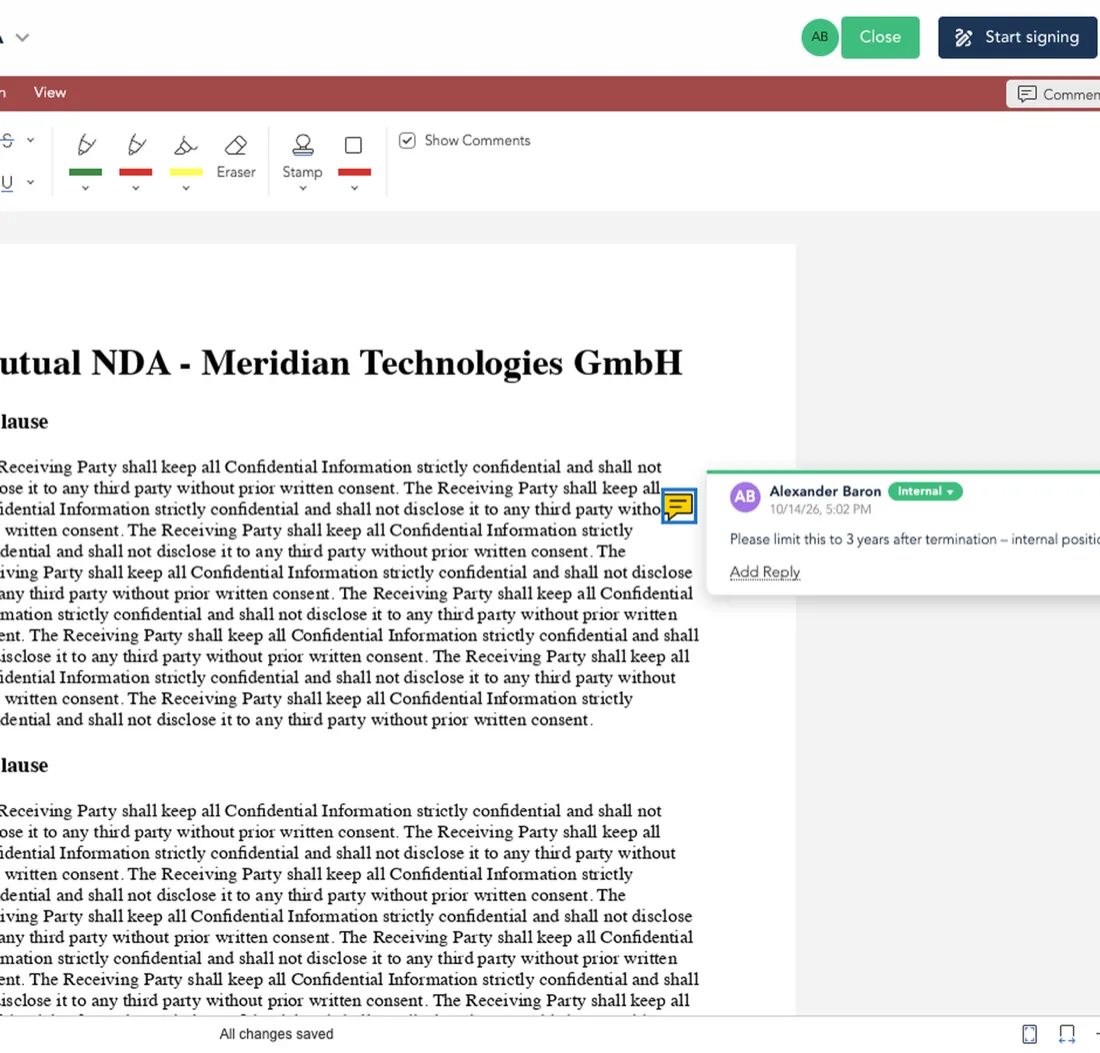
Select text and comment right on the clause. The comment is attached to the passage, not to a page number.
Real-time co-editing
Several people work in the same PDF at once and see changes in real time – no Acrobat licence each.
Redact PDFs
Permanently redact personal data, prices or confidential passages before a document is shared.
Convert PDF to Word
Turn a counterparty PDF into an editable Word document and keep negotiating in the contract editor with tracked changes.
AI inside the PDF
Ask questions about the contract and have passages explained without leaving the document.
Comments on the clause
Comment on the passage, not the page
Select text, write your comment – done. The passage is highlighted, your note is attached to it, and anyone opening the contract after a review round sees at a glance where the deal is actually contested.
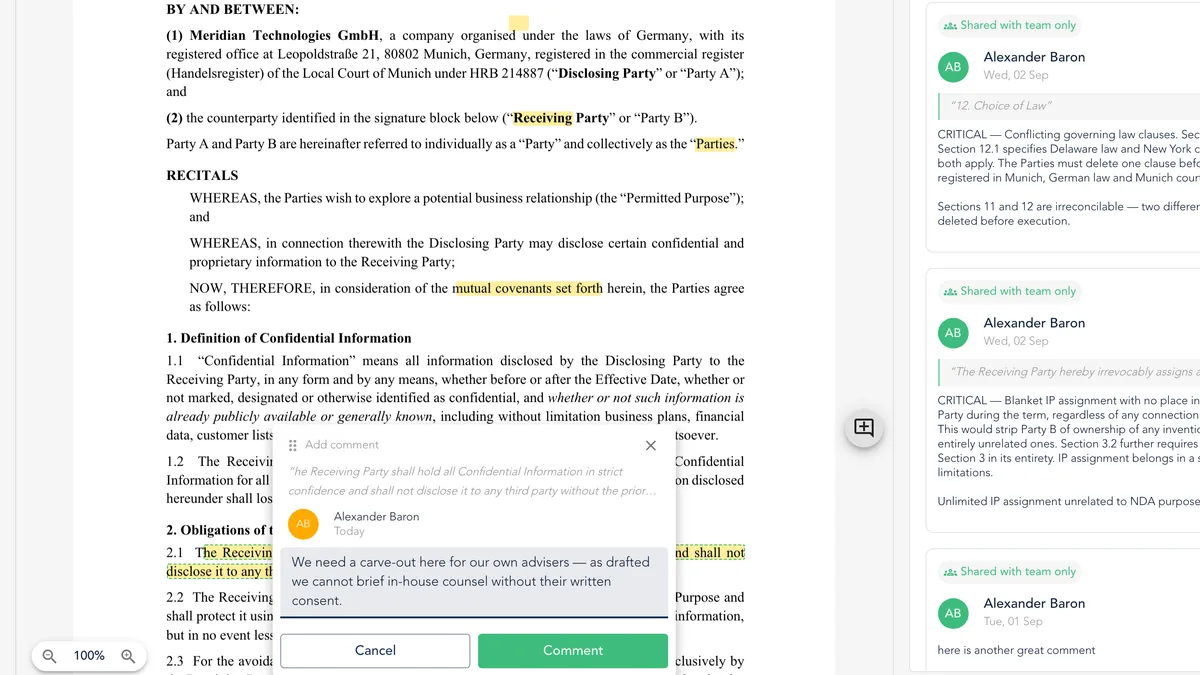
- Comment attached to the selected text
- Hover a highlight to read the comment in place
- Jump from the side panel straight to the passage
- The downloaded or signed PDF stays clean
For every team
Built for real-world PDF workflows around contracts
Legal
Review the counterparty's drafts, highlight critical clauses and align internally before you reply.
Procurement
Comment on supplier terms and quotes as PDFs and flag deviations for legal.
Sales
Review customer mark-ups inside the deal, resolve questions on the spot and get to signature faster.
Finance
Check amounts, payment terms and liability caps in the PDF and stamp them as reviewed.
Built for contracts
A PDF editor you can trust with your contracts
A generic PDF editor cannot tell an internal note from a negotiating position. The PDF editor in top.legal can.
Internal comments stay internal
Internal notes are stripped automatically on download. The counterparty only gets what it is meant to see.
Signed documents are read-only
Once a contract is signed the PDF is locked, so the executed version can never be changed by accident.
Saved automatically
Every change is saved to the deal immediately. No “Save as”, no file versions piling up in a downloads folder.
Hosted in the EU
Processed in Frankfurt am Main, GDPR compliant. Your contract content is not handed to a US cloud service.
Comparison
top.legal or Acrobat Pro for PDF contracts?
Acrobat Pro is an excellent general-purpose tool. For contracts, though, what matters is everything that happens around the PDF.
| top.legal PDF Editor | Adobe Acrobat Pro | |
|---|---|---|
| Licence | Included in the deal, no extra licence | One licence per person |
| Where editing happens | Right in the deal room, on the contract | A separate app next to your contract process |
| Internal comments | Stripped automatically on download | Must be removed by hand before sending |
| Versions | Saved automatically, one version in the deal | Files via download, upload and email |
| Signed documents | Locked read-only automatically | Protection set up manually |
| Approval and signature | In the same deal, eIDAS compliant | Separate product (Acrobat Sign) |
| Real-time co-editing | Live in the same PDF, with everyone involved | Shared review via shared files |
| Hosting | Frankfurt, EU | Adobe Document Cloud |
FAQ
For contract work, yes. You correct text, mark up, comment and add stamps and notes right in the deal room. Nobody on the team needs their own Acrobat licence for it.
Yes. You can correct text directly in the PDF, such as names, amounts or dates. For larger rewrites of a contract, the contract editor for DOCX documents is also available.
No. Internal comments stay in top.legal and are stripped automatically on download. The downloaded or signed PDF is always the clean document.
No. Uploaded PDFs open straight into the PDF editor in the browser. Every change is saved to the deal automatically – no download and re-upload.
Signed documents are locked read-only, so the executed version cannot be changed by accident.
In our data centres in Frankfurt am Main (AWS region eu-central-1). Processing is GDPR compliant and contract content does not leave the EU.
Yes. The PDF editor supports real-time co-editing. Everyone involved sees changes and comments instantly, without sending files back and forth.
Yes. You can permanently redact passages such as personal data, prices or confidential clauses before you share a document.
Yes. A PDF can be converted into an editable Word document and then edited further in the contract editor with tracked changes.
Yes. You can ask questions about the contract and have passages explained right inside the PDF, without leaving the document.
For teams that work on PDFs mainly as part of contracts, yes: editing, comments, approval and signature happen in the same deal, without an Acrobat licence per person. For general PDF tasks outside of contracts, a general-purpose editor still makes sense.
See the PDF editor on a contract of your own
Bring a real PDF from a counterparty. We open it in the editor and walk through markup, clause-level comments and the clean download – on your document.