
Edit contracts like in Word. Hosted in Europe.
A full DOCX editor built into top.legal — with tracked changes, comments and formatting that survives. No Microsoft 365 licence, no download, and your contracts never leave the EU.
- Hosted in the EU
- GDPR compliant
- Native DOCX
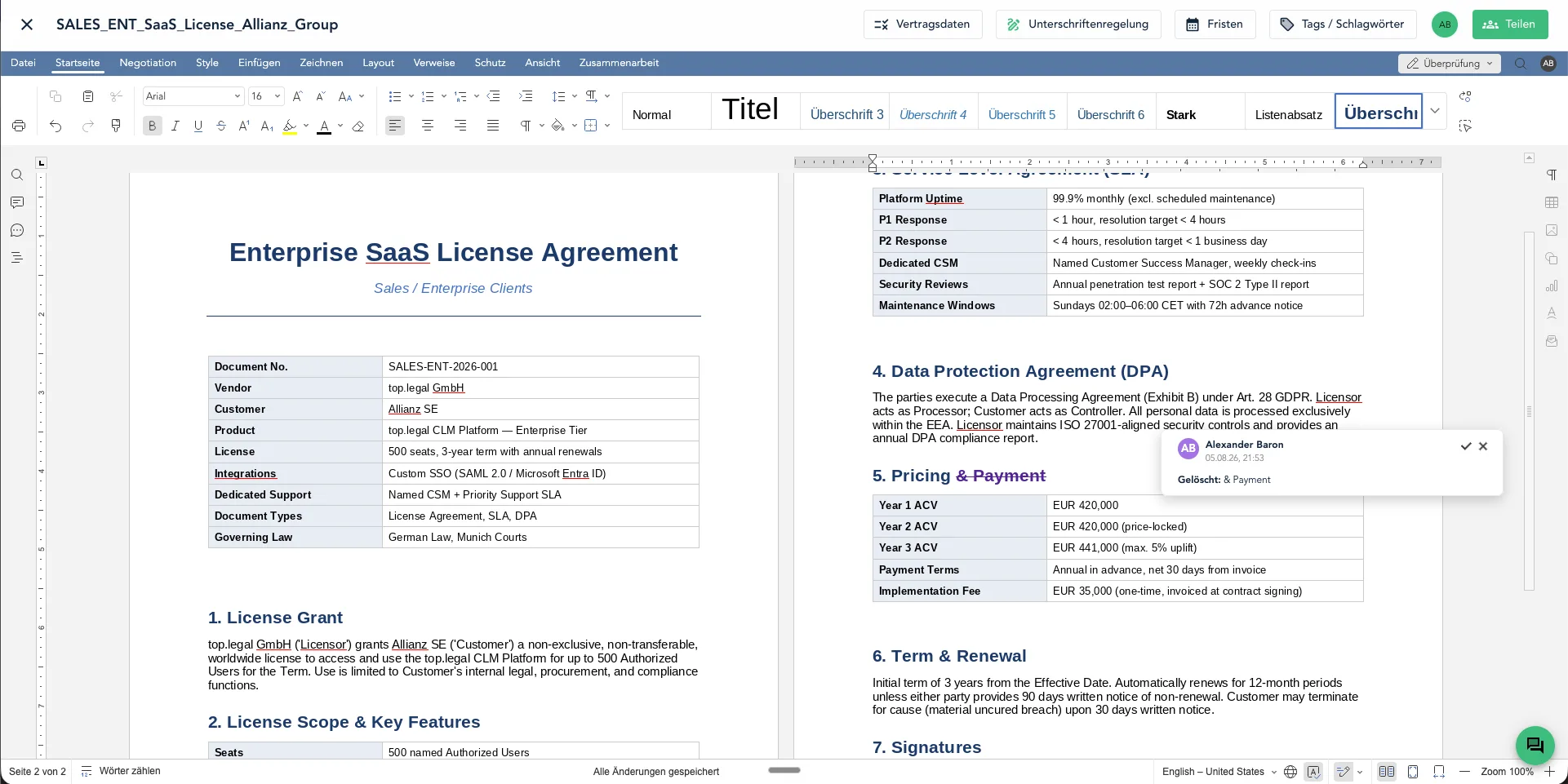
The problem
The contract lives in the CLM. It still gets edited in Word.
The moment someone needs to “just tweak something”, the file is downloaded, edited locally and mailed back. That removes exactly the control you introduced a contract management system for.
Download, edit, re-upload
Every edit leaves the system. The current version sits in an inbox, not in the CLM — and nobody is certain which file is authoritative.
Formatting that falls apart
Numbering shifts, cross-references break, comments vanish. Web editors that merely import DOCX cause precisely this damage.
Licences for occasional users
Business teams, procurement and external counterparties need an Office licence just to change one paragraph — or they work around your process entirely.
Contract data in foreign clouds
Editing contracts in a US cloud moves your most sensitive documents there. For regulated industries and the public sector that is increasingly not an option.
Features
A real editor — not a stripped-down web viewer
The contract editor is a full office editor that runs in the browser and reads and writes DOCX natively. Everything your lawyers know from Word works here — just without sending files around.
Tracked changes
Redlines like in Word: every insertion and deletion visible with author and timestamp, accepted or rejected one by one.
Simultaneous editing
Several people work live in the same document — internally and with the counterparty. No version conflicts, no “final_final_v3”.
Internal and external comments
Discuss positions in an internal thread the other side cannot see — and reply externally in the very same document.
Full DOCX fidelity
Numbering, cross-references, tables, headers and footers, styles. What you upload comes back out unchanged.
Version comparison
Put two versions side by side and see every deviation — including documents that come back edited externally.
Complete history
Every editing state is retained and restorable. For audits, disputes and internal review.
Internal and external comments
Align internally without the counterparty reading along
Every comment visibly carries whether it is internal or meant for the other side. Your team discusses positions, room to move and fallback options right at the paragraph — inside the same document the counterparty sees, without them ever seeing the internal thread.
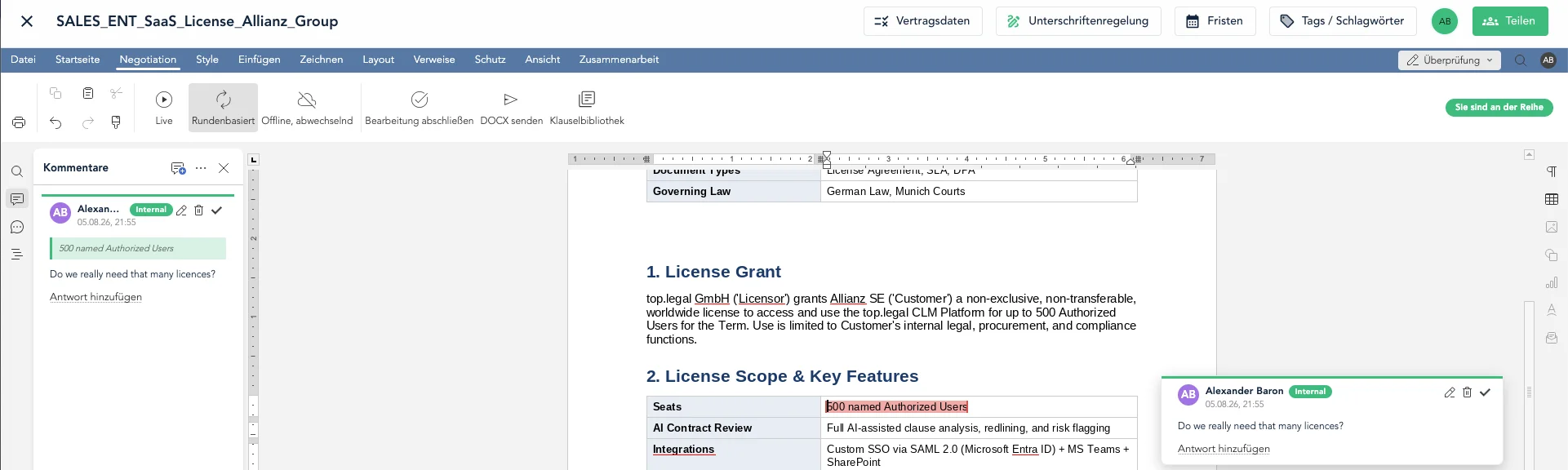
- Internal comments are marked “Internal” and stay invisible to external parties
- Comments live on the paragraph, not in an email chain
- Negotiate round-based or live — you control whose turn it is
- Tick off resolved points instead of digging through mail history
Wired into your CLM
Clauses and playbooks sit inside the editor
The editor is not a separate tool but part of the platform. Approved clauses, variations and fallback positions are available inside the document — and whatever you insert stays connected to the library.
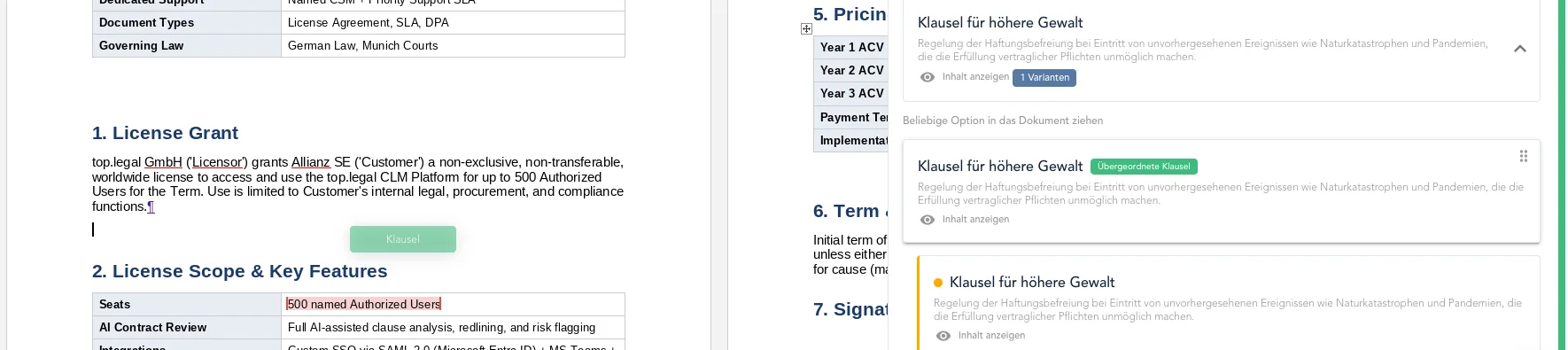
- Drag approved clauses from the sidebar straight into the right spot
- Switch through fallback variations during the negotiation
- Parent clauses define the wording that every variation derives from
- Approval workflow and signature follow without switching systems
From draft to signature
Edit, approve and sign — in one document
The same version becomes the PDF that goes into approval and into the eIDAS-compliant signature. No export, no re-upload, no gap between the negotiated and the signed version.
- 1Negotiate in the editor
- 2Rule-based approval
- 3Sign electronically
- 4Archived audit-proof
Digital sovereignty
Your contracts are edited in Europe — not merely stored there
Most CLM vendors outsource editing to a US cloud editor. At top.legal the editor runs on the same European infrastructure as the platform: Frankfurt am Main (eu-central-1), with no transfer to third countries.
Processing exclusively in the EU
Document content, conversion and rendering all happen in our Frankfurt data centres. No detour via an editing service outside the EU.
No Microsoft 365 dependency
The editor needs no Office licence and no Microsoft account — neither on your side nor the counterparty's. DOCX remains the exchange format regardless.
Built on open standards
The foundation is the open Office Open XML format, implemented in an open-source editor engine we operate ourselves. No proprietary file-format lock-in.
For regulated environments
Data processing agreement, deletion policy and technical measures cover the editor as well. Dedicated operating models for banks, insurers and public-sector buyers on request.
FAQ
No. The contract editor runs entirely in the browser and reads and writes DOCX natively. Neither your team nor the counterparty needs an Office licence to open, comment on or edit a document.
Yes. The document stays a DOCX file throughout — it is not converted into a proprietary format and back. Numbering, cross-references, tables, headers and footers and styles therefore remain intact when the other side opens the file in Word.
Exclusively in our data centres in Frankfurt am Main (AWS region eu-central-1). Unlike vendors that outsource editing to a US cloud editor, document content does not leave the EU for conversion or rendering.
Yes. You invite the other side to a specific document. They can propose changes and comment in the browser, while your internal comments and your playbook stay invisible to them.
Yes. Insertions and deletions are marked with author and timestamp and can be accepted or rejected individually. Redlines made in Word carry over — and the other way round.
The version negotiated in the editor is the same one that enters the approval workflow and then the eIDAS-compliant signature. There is no export-and-re-upload step in which the negotiated and the signed version could drift apart.
Editing happens in DOCX. DOC, ODT, RTF and TXT among others can be imported, and any version can be output as a PDF — for approval, signature and archiving.
See the contract editor on a contract of your own
Bring a real contract. We open it in the editor and walk through tracked changes, clause library and signature on your document — so you can see immediately whether the formatting holds.